

A PWM fan controller automatically adjusts a fan’s speed by varying its pulse-width-modulated signal based on temperature. In a DIY setup, an Arduino makes this easy: its digital I/O can generate PWM signals, read sensor’s data, and include libraries (like the DHT library) that simplify the coding. The DHT11 sensor outputs calibrated digital temperature values, avoiding the calibration fuss of analog thermistors. For example, one project notes that automated temperature-controlled fans “have become a popular DIY project” for efficient cooling.
After prototyping on breadboards, designers often move to a custom PCB. A custom PCB (from a fab like PCBWay) means solid solder joints, less wiring, and professional durability. All together, Arduino plus DHT11 lets beginners help to build a temperature-based fan controller quickly, and using a custom PCB (e.g. via PCBWay) further improves stability and performance.
Concept of PWM
A PWM fan controller allows precise regulation of fan speed using Pulse Width Modulation (PWM) technique that switches the power to the fan on and off rapidly, varying the duty cycle to control how much power the fan effectively receives. This method is far more efficient and quieter than using voltage-based speed control which makes it ideal for electronic device cooling, custom PC builds, or home automation.
What is a PWM Fan Controller?
A PWM fan controller works by sending square wave signals to a 3-pin or 4-pin fan. In 4-pin fans, the fourth pin directly accepts the PWM signal, while in 3-pin fans, PWM modulates the power line. The key parameter here is the duty cycle:
- 0% Duty Cycle: Fan is OFF.
- 50% Duty Cycle: Fan runs at half speed.
- 100% Duty Cycle: Fan runs at full speed.
This allows dynamic control of the fan’s RPM (Revolutions Per Minute) without introducing voltage instability or excess noise.
Circuit Diagram
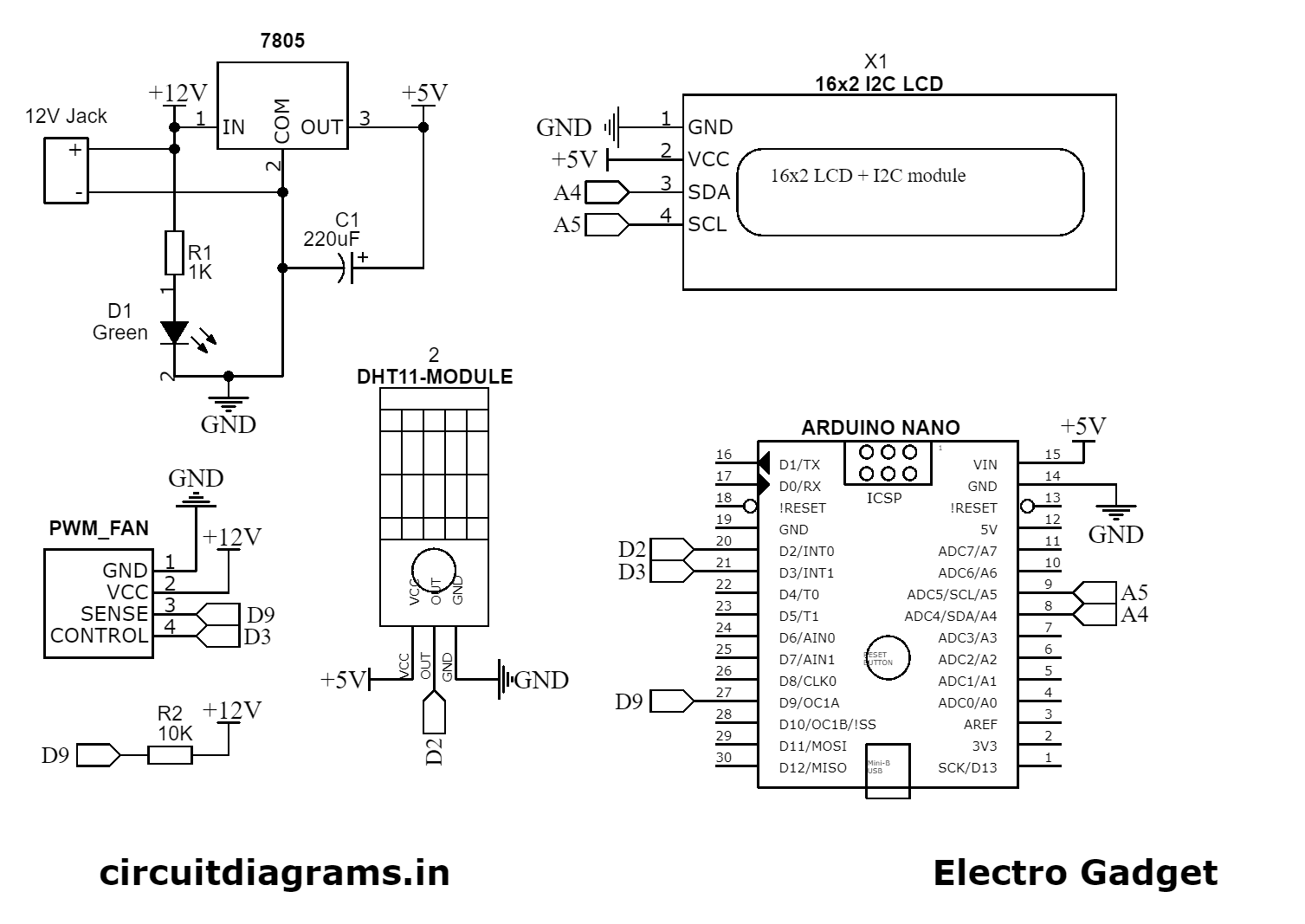
Components Required
- Arduino Nano [https://amzn.to/43JiD0X]
- DHT11 Temperature Sensor [https://amzn.to/4odmxbS]
- 16×2 I2C LCD Display [https://amzn.to/4mQ6TTe]
- 4-pin PWM DC fan (5V or 12V) [https://amzn.to/44TX4g9]
- 7805 Regulator [https://amzn.to/45pc4mi]
- Green LED
- Resistors (1K, 10K) [https://amzn.to/44SbNIq]
- 220uF/16V Capacitor [https://amzn.to/45aP3Cp]
- External Power Supply (for high-power fans) [https://amzn.to/3IR18VW]
- Breadboard and Jumper Wires [https://amzn.to/3U17ZOT]
Wiring Instructions
| Component | Pin on Component | Connects To |
|---|---|---|
| DHT11 Sensor | VCC | Arduino +5V |
| GND | Arduino GND | |
| DATA | D2 | |
| 16×2 I2C Display | VCC (Pin 4) | Arduino +5V |
| GND (Pin 3) | Arduino GND | |
| SDA (Pin 6) | A4 | |
| SCL (Pin 5) | A5 | |
| PWM Fan (4-pin) | GND (Black) | GND |
| VCC (Red) | 12V or 5V Power Supply (+) | |
| PWM (Blue) | D9 | |
| Tach (Yellow) [optional] | D3 | |
| 7805 Regulator | IN (Pin 1) | 12V Power Supply (+) |
| GND (Pin 2) | GND | |
| OUT (Pin 3) | Arduino +5V | |
| Capacitor C1 | – | Across IN and GND of 7805 |
Generate PCB for Temperature Controlled PWM Fan Controller
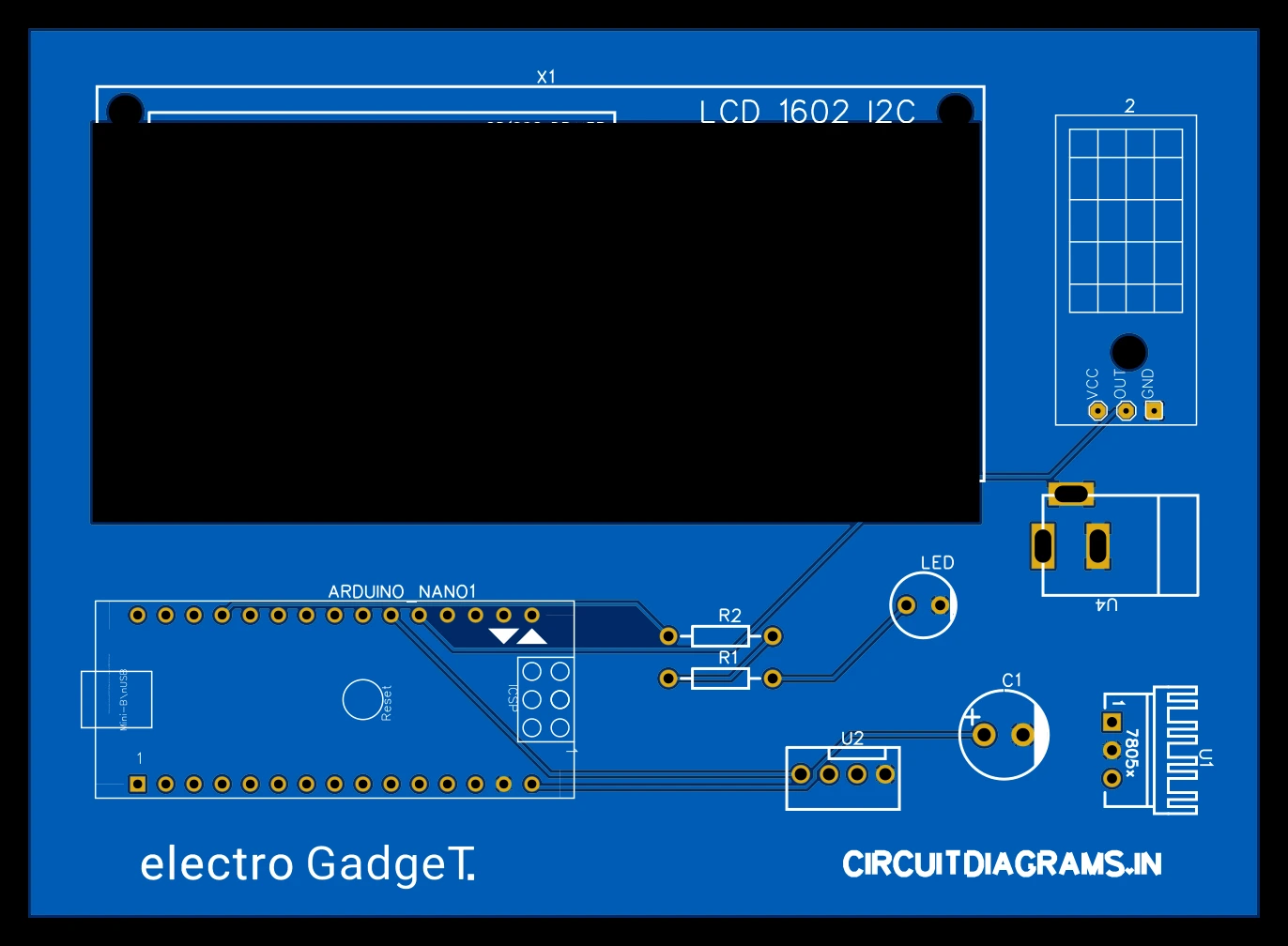
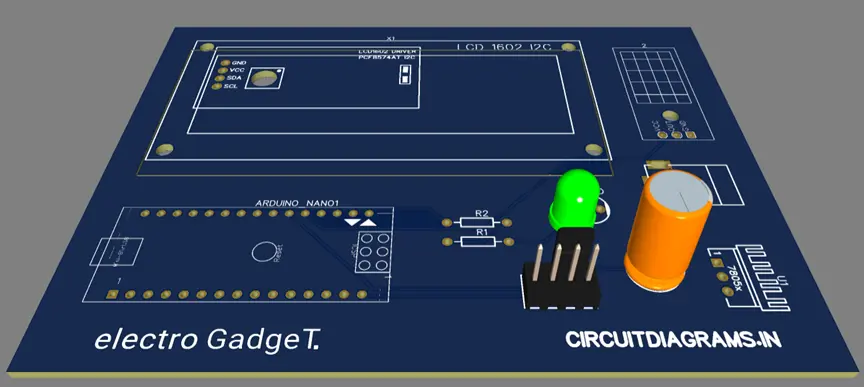
Advanced PCB Capabilities with PCBWay

Why Choose Advanced PCBs?
Basic PCBs are fine for simple projects—but for today’s demanding applications like AI, IoT, 5G, electric vehicles, and medical electronics, you need more:
- Higher signal integrity
- Better thermal management
- Miniaturization without sacrificing performance
- Support for complex layer stacks and fine-pitch components
That’s where PCBWay’s Advanced PCB services come in.
How PCBWay’s Advanced PCB Features Enhance Your Arduino PWM Fan Controller Projects?
“Advanced PCBs are the backbone of high-reliability, high-performance electronics — from industrial controllers to intelligent Arduino systems.”
When you’re building a PWM fan controller project with an Arduino, especially for real-world use cases like PC cooling, 3D printer ventilation, or automated greenhouse systems, using a professionally manufactured Advanced PCB makes your system more robust, compact, and production-ready.
PCBWay’s Advanced PCB capabilities can dramatically improve the quality, performance, and life span of your fan controller.
Advanced PCB Features That Elevate Fan Controller Projects
ENIG Plating (Electroless Nickel Immersion Gold)
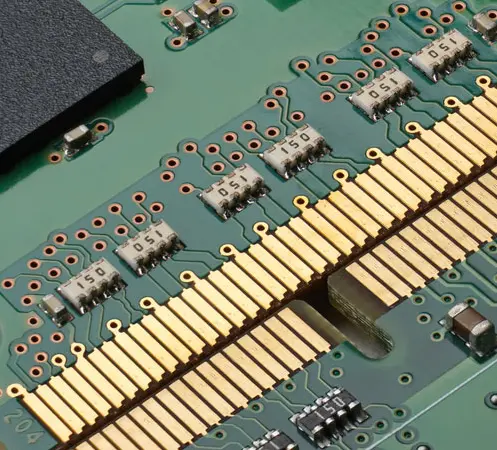
What it does:
Provides a flat, gold-coated surface on copper pads that improves conductivity, corrosion resistance, and solderability.
Why it matters for fan controllers:
- Ensures reliable connections for MOSFETs, connectors, and fan terminals
- Improves durability in high-humidity or dusty environments
- Prevents oxidation of exposed pads or traces over time
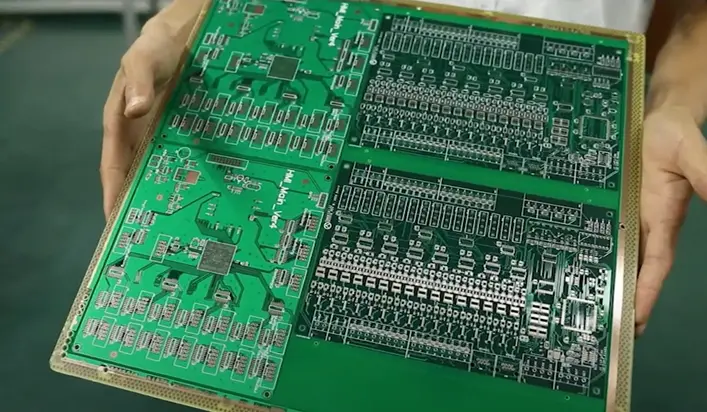
High-Tg Materials (High Glass Transition Temperature)
What it does:
Maintains structural and electrical integrity under high heat.
Benefits:
- Prevents warping when components like voltage regulators, MOSFETs, or fans produce heat
- Allows reliable operation in industrial enclosures or 3D printers
- Enhances mechanical strength for heavier components like relays or screw terminals
Impedance Control
What it does:
Ensures stable and predictable transmission of high-speed digital signals.
Why it’s important:
- Maintains PWM signal integrity over longer PCB traces
- Prevents signal distortion when switching fans at high frequencies (e.g., 25 kHz+ for noise-free operation)
- Reduces electromagnetic interference (EMI) around sensor and control lines
Additional PCBWay Advanced Features That Benefit Your Arduino Projects
| Feature | Why It’s Useful in PWM Fan Controllers |
|---|---|
| Laser Drilling | Enables ultra-small vias for compact multilayer designs |
| Buried/Blind Vias | Reduces board size and allows high-density routing |
| Rigid-Flex PCB Support | Ideal for modular or bendable enclosures |
| Thick Copper (up to 6oz) | Handles high fan currents without overheating |
| Vacuum Etching & Resin Plugging | Prevents solder leakage under BGA/fan connectors |
| Custom Shape & Paneling | Design custom enclosures or mount points for fans/sensors |
Why Choose PCBWay’s Advanced High-Quality PCB for Arduino Projects?
- Global sourcing from top-tier material suppliers like Rogers, Shengyi, and 3M
- State-of-the-art equipment: LDI, AOI, impedance testing, plasma processing
- Precision fabrication: 2.5/2.5mil trace spacing, 0.1mm laser vias, 64-layer capability
- Fast turnaround: Quote as low as $78, flexible quantities (1–1000+)
- Certified quality: IPC Class 2/3, UL, ISO9001, RoHS, TS16949, automotive-grade standards
- Customer-first service: Free DFM checks, individual engineering support
Key Advanced PCB Capabilities at PCBWay
1. High-Layer Count PCBs (Up to 40 Layers)
For powerful multi-core processors, high-speed backplanes, and RF systems, PCBWay can fabricate boards with up to 40 layers, while ensuring impedance control and inter-layer integrity.
2. HDI (High-Density Interconnect) PCBs
With laser-drilled microvias, via-in-pad, and sequential lamination, PCBWay supports ultra-compact designs perfect for smartphones, tablets, and miniaturized IoT devices.
3. Flexible & Rigid-Flex PCBs
Combine flexibility with structural strength. Ideal for aerospace, medical, and wearable electronics that demand movement and compact form factors.
4. High-Frequency/RF PCBs
Using premium materials like Rogers, Taconic, and Isola, PCBWay delivers low-loss PCBs for RF, microwave, and antenna-based applications.
5. High-Tg & High-Temperature PCBs
For harsh environments (e.g., automotive, industrial), PCBWay offers High-Tg materials that withstand high soldering temperatures and ensure thermal reliability.
6. Metal Core PCBs (MCPCBs)
Designed for high-power LED, power supply, and electric vehicle systems, these boards dissipate heat effectively and prevent thermal failure.
Whether you’re building an Arduino PWM fan controller or preparing for mass production, PCBWay’s Advanced PCB features like ENIG plating, high-Tg materials, and impedance control ensure your design performs reliably under real-world conditions.
Component Overview
Why Use Arduino for a PWM Fan Controller?
Arduino is ideal for DIY electronics projects for several reasons:
- Simple to Use: Arduino’s coding environment is beginner-friendly and well-documented.
- PWM Output: Most Arduino boards (like Uno, Nano) have multiple PWM-enabled digital pins.
- Modular Integration: Easily connect sensors (like DHT11), displays, and relays.
- Affordable and Widely Available: A complete setup costs very little.
- Huge Community Support: Countless libraries, tutorials, and examples are available online.
Arduino’s analogWrite() function lets you easily generate PWM signals to control fan speed based on input data like temperature.
Why Use a DHT11 Sensor for Temperature-Based Fan Control?
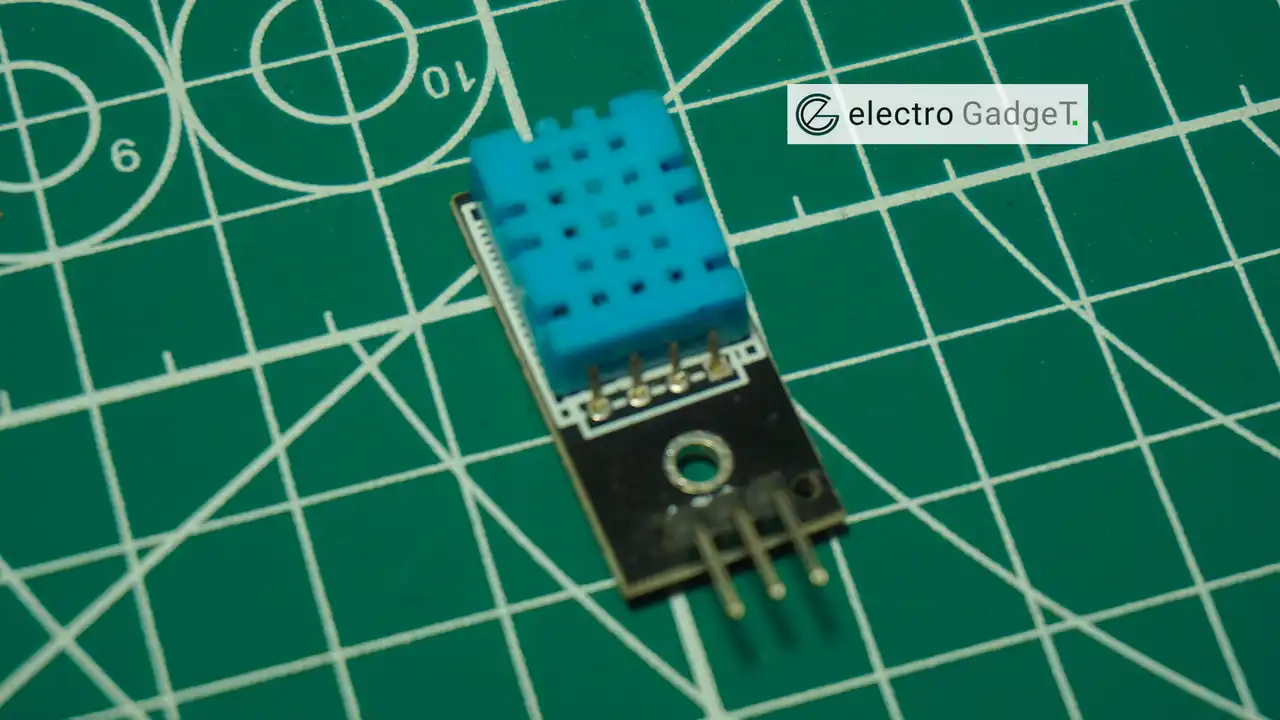
The DHT11 digital temperature sensor offers several key advantages over a traditional thermistor when used in Arduino fan control projects, particularly in terms of ease of use, accuracy, and coding simplicity:
Advantages of DHT11 over Thermistor
| Feature | DHT11 Digital Sensor | Thermistor (Analog Sensor) |
|---|---|---|
| Output Type | Digital (pre-calculated values) | Analog (requires conversion) |
| Ease of Use | Plug-and-play with libraries | Requires voltage divider + ADC + formulas |
| Code Support | Built-in libraries (like DHT.h) | Manual conversion using Steinhart-Hart or lookup tables |
| Temperature Range | 0–50°C (±2°C accuracy) | Wider range but accuracy varies |
| Humidity Measurement | Yes (combined in one sensor) | No |
| Stability | Stable digital output | Prone to noise, requires filtering |
1. Digital Output – No Analog Conversion Required
Thermistors output analog voltage that changes with temperature, so you need:
- A voltage divider circuit
- Arduino’s analog-to-digital converter (ADC)
- Calibration formulas to get actual temperature
In contrast, the DHT11 sends a digital signal with the temperature already calculated in Celsius — no math or ADC needed.
2. Simple Integration with Arduino Code
With DHT11, you can start coding in seconds:
#include <DHT.h>
DHT dht(2, DHT11);  // Pin 2, sensor type DHT11
dht.readTemperature();Other hand thermistor requires:
- Must calculate resistance
- Apply Steinhart-Hart equation or use a lookup table
- Handle noisy analog readings with averaging
This makes DHT11 much more beginner-friendly.
3. Library and Community Support
DHT11 is widely supported by:
- Official Arduino libraries (
DHT.h,Adafruit_Sensor.h) - Thousands of tutorials
- Quick debugging and support
Thermistors vary by brand/spec, so code and resistance tables are often custom per project.
4. Bonus: Humidity Measurement
DHT11 also provides humidity data, which thermistors do not. While not essential for fan control, this allows you to:
- Add a humidity-triggered fan mode
- Monitor environment conditions in greenhouses or enclosures
5. No Calibration Required
Thermistors often require:
- Manual calibration
- Adjustment based on ambient voltage and pull-up resistors
DHT11 comes factory calibrated, so it works right out of the box.
Source Code
Libraries Required
// Arduino Nano PWM fan control + DHT11 + 16x2 I2C LCD
// Fan control: PWM on D6 (blue), Tach on D3 (yellow), DHT11 on D9
// LCD: I2C 16x2 at 0x27 (change to 0x3F if needed)

#include <Wire.h>
#include <LiquidCrystal_I2C.h>
#include "DHT.h"

// ----- DHT11 -----
#define DHTPIN 9
#define DHTTYPE DHT11
DHT dht(DHTPIN, DHTTYPE);

// ----- Fan pins -----
const uint8_t FAN_PWM_PIN  = 6;  // PWM control (blue)
const uint8_t FAN_TACH_PIN = 3;  // Tach input (yellow), interrupt-capable

volatile unsigned long tachPulses = 0;
unsigned long lastRPMMillis = 0;
int lastRPM = 0;

// ----- LCD -----
LiquidCrystal_I2C lcd(0x27, 16, 2); // Change 0x27 to 0x3F if your module differs

// ISR for tach signal
void tachISR() {
  tachPulses++;
}

void setup() {
  dht.begin();

  // LCD init
  Wire.begin();
  lcd.init();
  lcd.backlight();
  lcd.clear();
  lcd.setCursor(0, 0);
  lcd.print("Fan Ctrl + DHT11");
  lcd.setCursor(0, 1);
  lcd.print("Init...");

  pinMode(FAN_PWM_PIN, OUTPUT);
  pinMode(FAN_TACH_PIN, INPUT_PULLUP);
  attachInterrupt(digitalPinToInterrupt(FAN_TACH_PIN), tachISR, FALLING);

  // Safe spin-up duty
  analogWrite(FAN_PWM_PIN, 80); // ~31% duty
  delay(1000);
  lcd.clear();
}

void loop() {
  // Read DHT11 (approx 1Hz is reliable)
  float t = dht.readTemperature();

  // Map temperature to PWM duty
  uint8_t duty;
  if (!isnan(t)) {
    if (t < 25)       duty = 0;    // Fan off
    else if (t < 30)  duty = 25;   // ~25%
    else if (t < 35)  duty = 50;   // ~50%
    else if (t < 40)  duty = 150;  // ~70%
    else              duty = 255;  // 100%
  } else {
    duty = 128; // fallback mid if sensor failed
  }
  analogWrite(FAN_PWM_PIN, duty);

  // Compute RPM over a 1s window (2 pulses/rev typical)
  unsigned long now = millis();
  if (now - lastRPMMillis >= 1000) {
    noInterrupts();
    unsigned long pulses = tachPulses;
    tachPulses = 0;
    interrupts();
    lastRPM = (int)(pulses * 30); // RPM = pulses_per_sec / 2 * 60
    lastRPMMillis = now;
  }

  // LCD display
  // Line 1: T:xx.xC
  lcd.setCursor(0, 0);
  if (isnan(t)) {
    lcd.print("T:---.-C   ");
  } else {
    lcd.print("T:");
    char tbuf[9];
    dtostrf(t, 5, 1, tbuf); // width 5, 1 decimal
    lcd.print(tbuf);
    lcd.print("C   ");
  }

  // Line 2: D:pp% RPM:rrrr
  lcd.setCursor(0, 1);
  lcd.print("D:");
  int dutyPct = (int)((duty * 100UL) / 255);
  if (dutyPct < 10) lcd.print(" "); // spacing
  if (dutyPct < 100) lcd.print(" ");
  lcd.print(dutyPct);
  lcd.print("% RPM:");

  char rpmbuf[6];
  snprintf(rpmbuf, sizeof(rpmbuf), "%4d", lastRPM);
  lcd.print(rpmbuf);

  delay(500);
}Testing
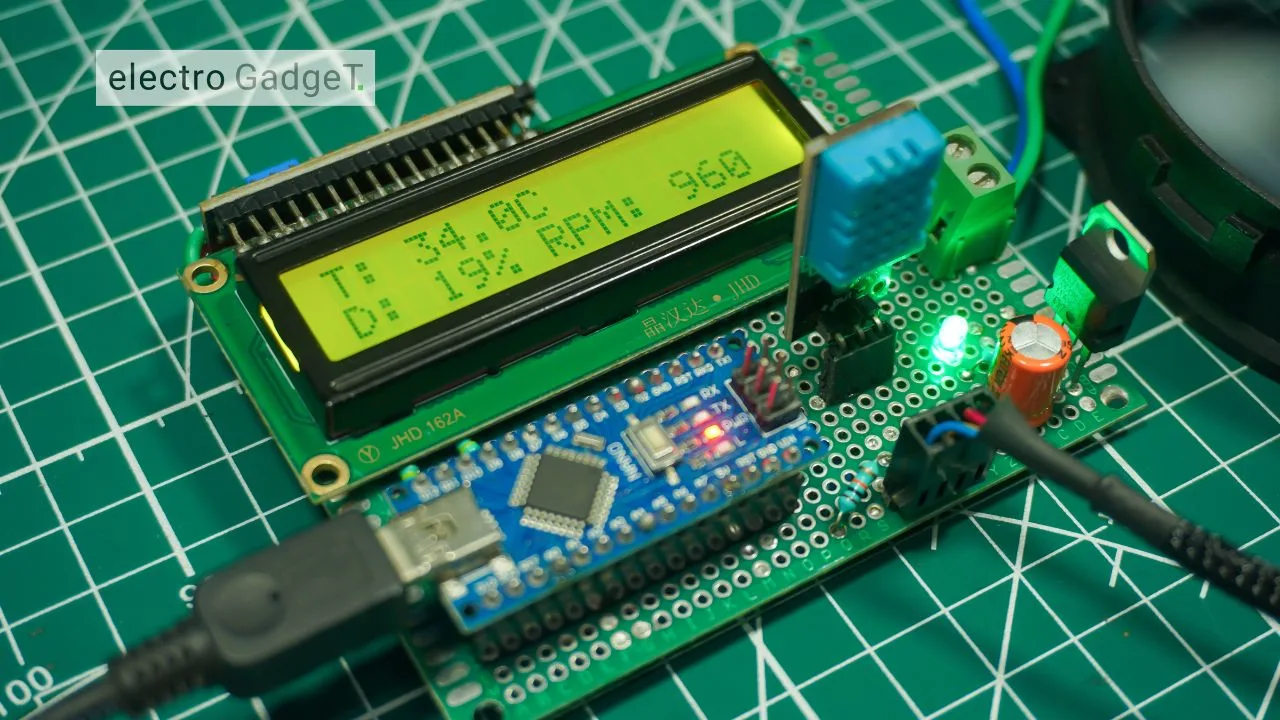
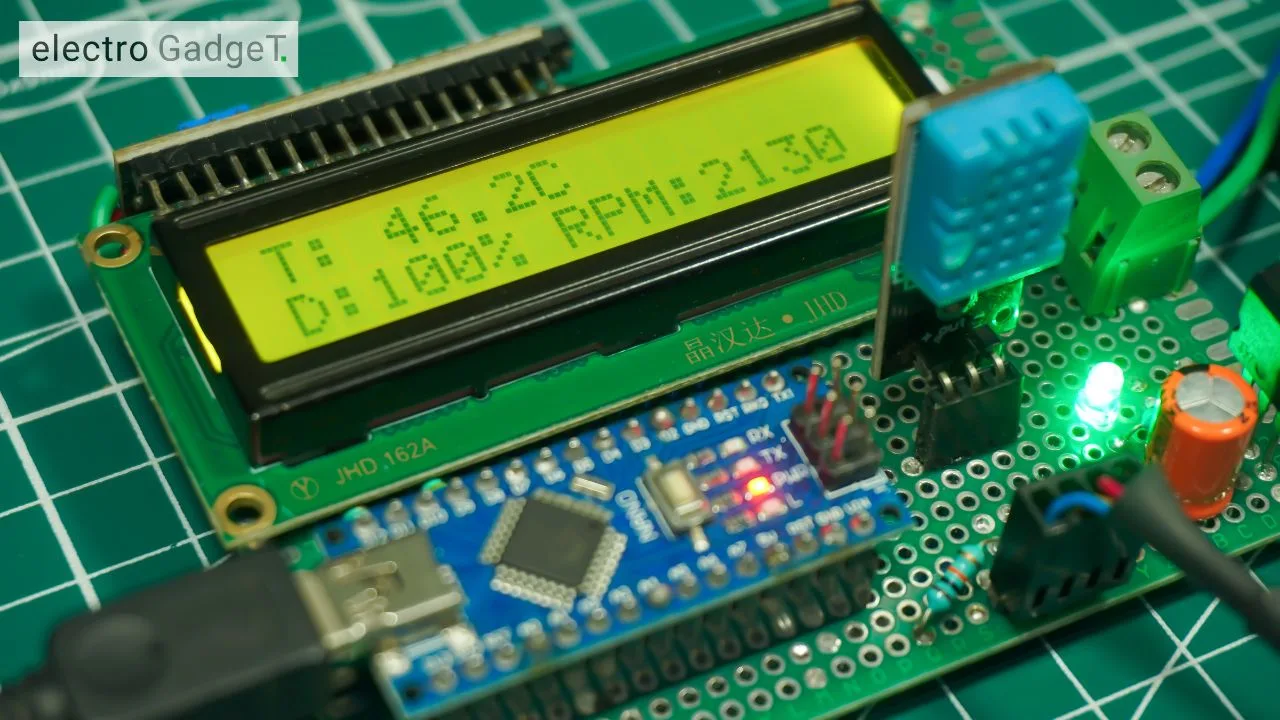
Video Output
Comparing PWM, DC, and Thermostat Fan Control Methods
| Feature | PWM-Based Fan Control | Fixed-Speed DC Fan | Thermostat-Controlled Fan |
|---|---|---|---|
| Speed Control | Variable speed via duty cycle (0–100%) | Constant speed only | Binary (ON/OFF) based on threshold |
| Energy Efficiency | Very efficient – uses only required power | Least efficient – always draws full current | Moderate – saves energy when off, but no speed scaling |
| Precision | High – adjusts fan speed smoothly based on real-time data | None – runs at full speed regardless of need | Low – simple temperature threshold control |
| Noise Levels | Low – fan can run silently at low speeds | High – fan always at max speed | Moderate – cycles between loud ON and quiet OFF |
| Temperature Response | Real-time dynamic response | No response | Delayed response (hysteresis) |
| Control Method | Microcontroller-based (e.g., Arduino + PWM pin) | Direct power (no control) | Analog/digital switch (relay, bimetallic sensor, etc.) |
| Design Complexity | Medium – requires PWM signal and possibly MOSFET | Simple – just power and ground | Simple to medium – thermostat + relay or switch |
| Reliability | High – precise, controlled operation reduces overheating risk | High – fewer components, but poor thermal management | Variable – depends on sensor type and response quality |
When Should You Use PWM Instead of Analog or On-Off Control?
PWM (Pulse Width Modulation) fan control excels in scenarios where dynamic performance, energy efficiency, and noise reduction are crucial. Below are key real-world situations where PWM-based fan control is clearly superior:
1. Variable Load Environments
Scenario:
Devices like 3D printers, power supplies, PCs, and embedded systems generate heat based on workload, which varies constantly.
Why PWM Wins:
- Adjusts fan speed in real-time based on temperature or CPU load.
- Prevents unnecessary full-speed operation when the system is idle or lightly loaded.
- Improves thermal management without wasting power.
2. Silent Operation Requirements
Scenario:
In home theaters, office workstations, smart home enclosures, or medical devices, fan noise must be minimal.
Why PWM Wins:
- Fans can run at low RPM during light usage, significantly reducing noise.
- Maintains quiet background operation while still cooling efficiently.
- Ideal for systems that run continuously but don’t always require full-speed cooling.
3. Precise Fan Speed Tuning
Scenario:
For calibrated systems (like lab instruments or custom enclosures), precise airflow control is needed.
Why PWM Wins:
- Offers fine-grained speed control via duty cycle (0–100%) without changing voltage.
- Enables exact tuning of airflow for sensitive electronics.
- Can be programmed to follow a custom fan curve based on sensor feedback.
4. Energy-Conscious or Battery-Powered Systems
Scenario:
In IoT devices, remote sensing stations, or battery-backed enclosures, energy efficiency is critical.
Why PWM Wins:
- Fan runs only when needed, extending battery life.
- Draws less current at lower duty cycles compared to fixed-speed fans.
- Helps meet low-power design goals in off-grid or solar-powered setups.
5. Smart Systems and Automation
Scenario:
Smart cooling solutions for Arduino, Raspberry Pi, ESP32, and industrial control units.
Why PWM Wins:
- Easily integrates with microcontrollers and sensors for fully automated thermal control.
- Supports real-time adjustments based on multiple parameters (e.g., temp, humidity, system load).
- Enables remote monitoring and fan speed control via web, Bluetooth, or cloud.
Troubleshooting Common Issues with PWM Fan Controllers
1. Fan Not Spinning
Cause: Incorrect wiring, incompatible fan, insufficient current, or missing PWM signal.
Fix:
- Confirm correct VCC/GND connections.
- Ensure fan supports PWM (use 4-pin fan).
- Connect PWM wire to Arduino PWM pin (e.g., D9).
- Use analogWrite(fanPin, 100) to test.
- Use external power if fan draws >500mA.
2. Fan Always at Full Speed
Cause: PWM signal not connected or ignored.
Fix:
- Verify PWM wire is connected to the correct Arduino pin.
- Lower PWM duty (analogWrite(fanPin, 80)).
- Replace with PWM-compatible fan (4-pin).
3. Noisy Operation
Cause: Low PWM frequency or mechanical wear.
Fix:
- Increase PWM frequency (use timer settings or tone library).
- Reduce speed via PWM to lower RPM.
- Clean or replace the fan if damaged.
4. Incorrect Temperature Readings
Cause: Bad signal, no pull-up, or over-polling.
Fix:
- Add 10kΩ pull-up resistor on DHT11 DATA pin.
- Delay at least 1s between reads.
- Use isnan() to validate readings.
- Avoid long DATA wires or electrical noise.
5. Fan Speed Not Changing
Cause: Temperature not affecting PWM output.
Fix:
- Use map() or conditional logic to vary analogWrite() based on temperature.
- Ensure temperature is updating in
loop(). - Print debug values to Serial Monitor.
Advantages of PWM Fan Controller
- Automatic Temperature-Based Control: Adjusts fan speed in real time based on ambient temperature, improving efficiency and responsiveness.
- Energy Efficiency: Fan runs only as needed, reducing power consumption and extending component life.
- Noise Reduction: Low fan speeds at cooler temperatures result in quieter operation compared to fixed-speed fans.
- Digital Accuracy: DHT11 provides stable digital temperature readings, requiring no calibration or analog conversion.
- Customizability: Easily programmable using Arduino; logic, thresholds, and behavior can be modified to suit specific needs.
- Expandable Design: Can be upgraded with OLED displays, multiple fans, Bluetooth/Wi-Fi modules, and RPM feedback.
Limitations of PWM Fan Controller
- Limited Sensor Accuracy: DHT11 has a ±2°C accuracy and a limited range (0–50°C); may not be suitable for critical environments.
- PWM Compatibility Required: Only works directly with 4-pin PWM fans; 2/3-pin fans require extra hardware (like MOSFETs or transistors).
- No Built-in RPM Feedback: Basic setup doesn’t monitor actual fan speed, so feedback or failure detection isn’t included by default.
- Single-Zone Control: This version monitors temperature from a single point and controls one fan; not ideal for multi-zone applications without expansion.
- No Manual Override: Fan speed depends entirely on code logic; without buttons or UI, real-time manual control isn’t possible.
Frequently Asked Questions (FAQs)
Q1. Can I use a 3-pin DC fan instead of a 4-pin PWM fan?
A: Yes, but not directly. 3-pin fans require voltage control via a transistor or MOSFET. You’ll need to modulate the fan’s power line using PWM and a switching component since they don’t have a dedicated PWM input pin.
Q2. Why is my fan not spinning at low PWM values?
A: Most fans require a minimum starting voltage or duty cycle (usually ~30-40%) to overcome inertia. Start the fan at a higher PWM value and then lower it gradually if needed.
Q3. Can I replace the DHT11 with a DHT22 sensor?
A: Yes. DHT22 has better accuracy and a wider temperature range. It’s also supported by the same Arduino DHT.h library with just a change in sensor type definition (DHT22 instead of DHT11).
Q4. How do I control multiple fans based on different temperatures?
A: You can connect multiple temperature sensors (like DHT11 or DHT22) to different pins and assign each to its own fan output pin using separate analogWrite() calls. Ensure your power supply can handle the combined load.
Q5. Can I monitor or log temperature and fan speed?
A: Yes. You can:
Print temperature and PWM values via Serial Monitor
Add an OLED or LCD display
Use a tachometer wire (if the fan has one) to read actual RPM
Integrate SD card logging or Wi-Fi modules for remote monitoring
Conclusion
With this project, you’ve successfully built a temperature-dependent PWM fan controller using an Arduino Nano and a DHT11 digital temperature sensor. The system automatically adjusts fan speed in real-time based on ambient temperature, offering smarter cooling, lower noise, and improved energy efficiency compared to traditional fixed-speed or thermostat-controlled fans.






Thanks
Nice work !!👏
Keep working ✨✊