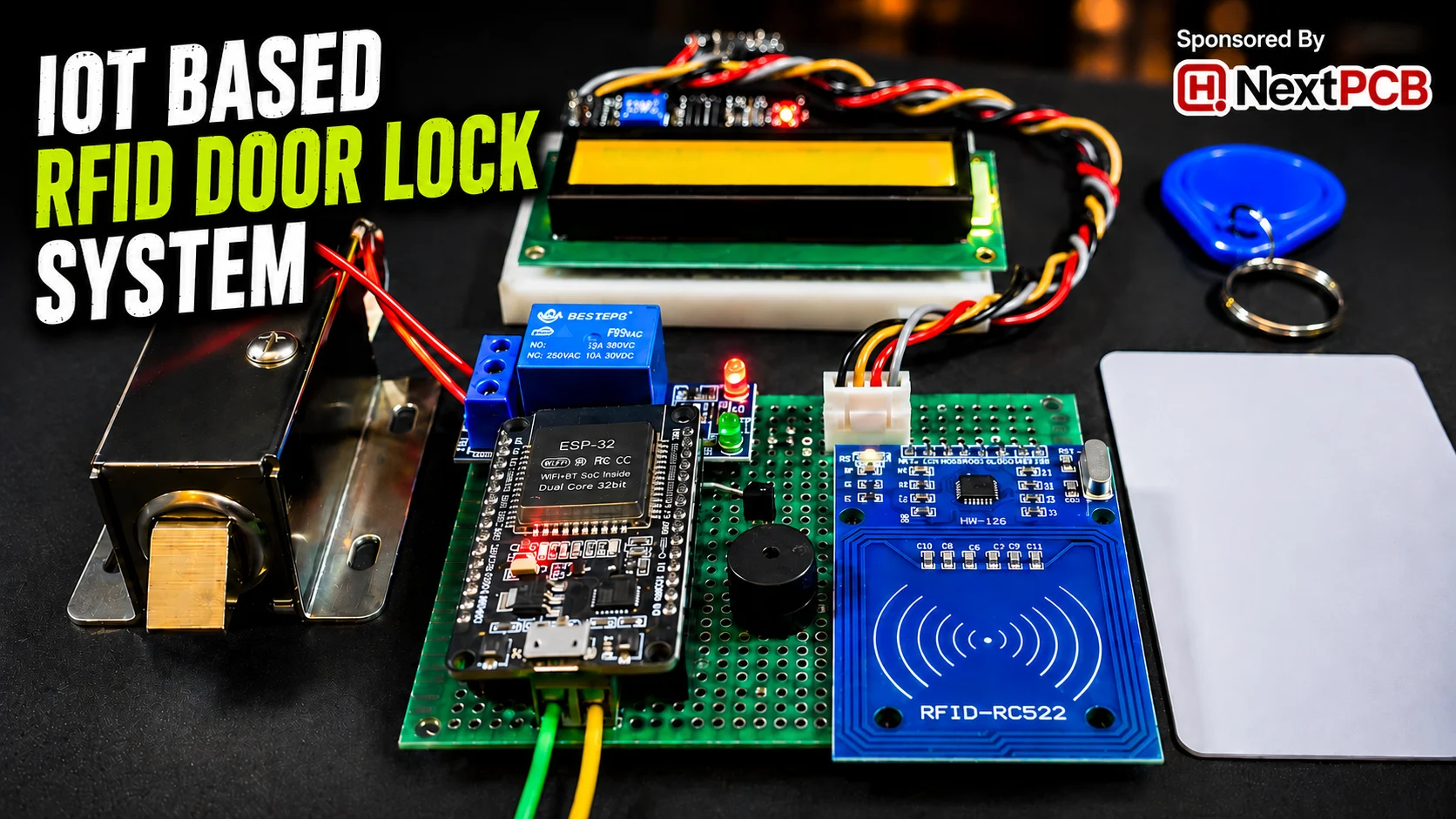
Security is one of the most important parts of any home, office, lab, or restricted area. Traditional lock-and-key systems are simple, but they also have many limitations. Keys can be lost, duplicated, or used by unauthorized people. That is why modern electronic access systems are becoming more popular. One of the most practical and affordable solutions is an RFID-based door lock system.
In this project, an ESP32-based RFID door lock system with web dashboard is used to provide smarter and more flexible access control. This project is sponsored by NextPCB, a PCB and PCBA manufacturer that helps makers, engineers, and developers turn prototype circuits into professional boards. The system reads RFID cards, verifies authorized users, controls a relay-based door lock, shows status on an LCD, and stores user and log data through a web interface. This makes it much more powerful than an ordinary door lock because it combines security, monitoring, and easy management in one system.
What is an RFID-Based Door Lock System?
An RFID door lock system is an electronic security system that uses Radio Frequency Identification technology to control access. Instead of opening a door with a physical key, the user places an RFID card or tag near an RFID reader. The reader detects the unique ID of that card and checks whether it is allowed access. If the card is authorized, the system unlocks the door. If the card is unknown, access is denied.
This method makes entry faster, easier, and more secure for many applications. In this project, the MFRC522 RFID module reads the card UID, the ESP32 checks it against saved user records, and then the relay locks or unlocks the door depending on the result. The system can also show messages on the LCD and create entry-exit logs for better monitoring. For a practical installation, converting the circuit into a custom PCB can make the wiring cleaner, reduce loose connections, and improve the overall reliability of the door lock system.
Why Use ESP32 for Smart Access Control?
The ESP32 is an excellent choice for smart access control because it offers much more than a basic microcontroller. It has built-in Wi-Fi, good processing power, enough GPIO pins for connecting modules, and strong support for IoT projects. This allows the same device to handle RFID reading, relay control, LCD display, buzzer alerts, and a live web dashboard all together.
In this project, the ESP32 does not only verify RFID cards. It also runs a web server, serves dashboard pages from SPIFFS, manages user data in JSON files, controls the relay, and records access logs with timestamps. Because of these features, ESP32 becomes a complete solution for building a smart and connected door security system without needing many extra modules. When moving from a test setup to a final product-style build, PCB and PCBA services are useful because the ESP32, RFID reader, relay driver, buzzer, LCD connector, and power section can be arranged neatly on a single board.
Benefits of IoT-Based Door Security Systems
An IoT-based door security system offers many advantages compared to a normal lock or even a simple standalone RFID lock. First, it improves convenience because users can be added or removed digitally without changing locks. Second, it improves monitoring because entry and exit records can be stored and viewed later. Third, it allows real-time control through a web dashboard, making the system easier to manage.
Another major benefit is scalability. Once the basic system is working, more smart features can be added in the future, such as remote notifications, cloud logging, mobile app access, or multi-door integration. In this ESP32 project, the combination of RFID authentication, door relay control, LCD status display, buzzer feedback, JSON-based user storage, and web-based management shows how IoT can turn a simple lock into a smart access control platform.
For makers, students, and electronics developers, the project can begin as a prototype using modules and jumper wires. However, for long-term use in a home, office, lab, hostel, or restricted area, a professionally manufactured PCB or assembled PCBA can make the system more durable, compact, and easier to install inside an enclosure. This is where services from the project sponsor, NextPCB, can be helpful for turning the ESP32 RFID door lock circuit into a cleaner and more production-ready hardware design.
Features of ESP32 RFID Door Lock System
An ESP32 RFID door lock system offers several useful features that make it smarter than a normal lock. It combines RFID authentication, web-based control, logging, alerts, and display monitoring into one complete access control solution. Based on your uploaded project code, these are the main features:
- RFID-based secure authentication
The system reads the unique UID of each RFID card using the MFRC522 RFID module. The ESP32 checks whether the UID matches an authorized user stored in the system. If the card is valid, the door unlocks. If not, access is denied. - Web dashboard for user management
The ESP32 runs a built-in web server that allows user-related actions through a browser. It serves web pages from SPIFFS and supports adding or deleting RFID users without changing the hardware setup manually. - Real-time entry and exit logging
The project stores access records in a logs.json file. It keeps track of user UID, name, entry time, exit time, and total stay duration. This helps in monitoring who entered and when they left. - Relay-controlled door locking mechanism
The door lock is controlled using a relay connected to the ESP32. When an authorized card is scanned, the relay changes state to unlock the door. When the user exits, the relay locks the door again. This makes the system suitable for electric lock automation. - Buzzer alert for unauthorized access
If an unknown RFID card is scanned, the buzzer gives an alert sound. This provides instant warning for unauthorized access attempts and makes the security system more responsive. - LCD display for status monitoring
A 16×2 I2C LCD display shows important system messages such as booting, Wi-Fi connection, card detected, access denied, welcome message, goodbye message, and ready-for-scan status. This improves user interaction and makes the system easier to use. - SPIFFS-based data storage
The system uses SPIFFS to store user information and access logs in JSON format. This allows data to remain saved even after restarting the ESP32, which is very useful for practical door access systems. - Wi-Fi enabled smart access control
Since ESP32 has built-in Wi-Fi, the project can connect to a local network and provide access to its dashboard through an IP address. This gives the system an IoT-based smart control advantage over traditional RFID locks.
Circuit Diagram
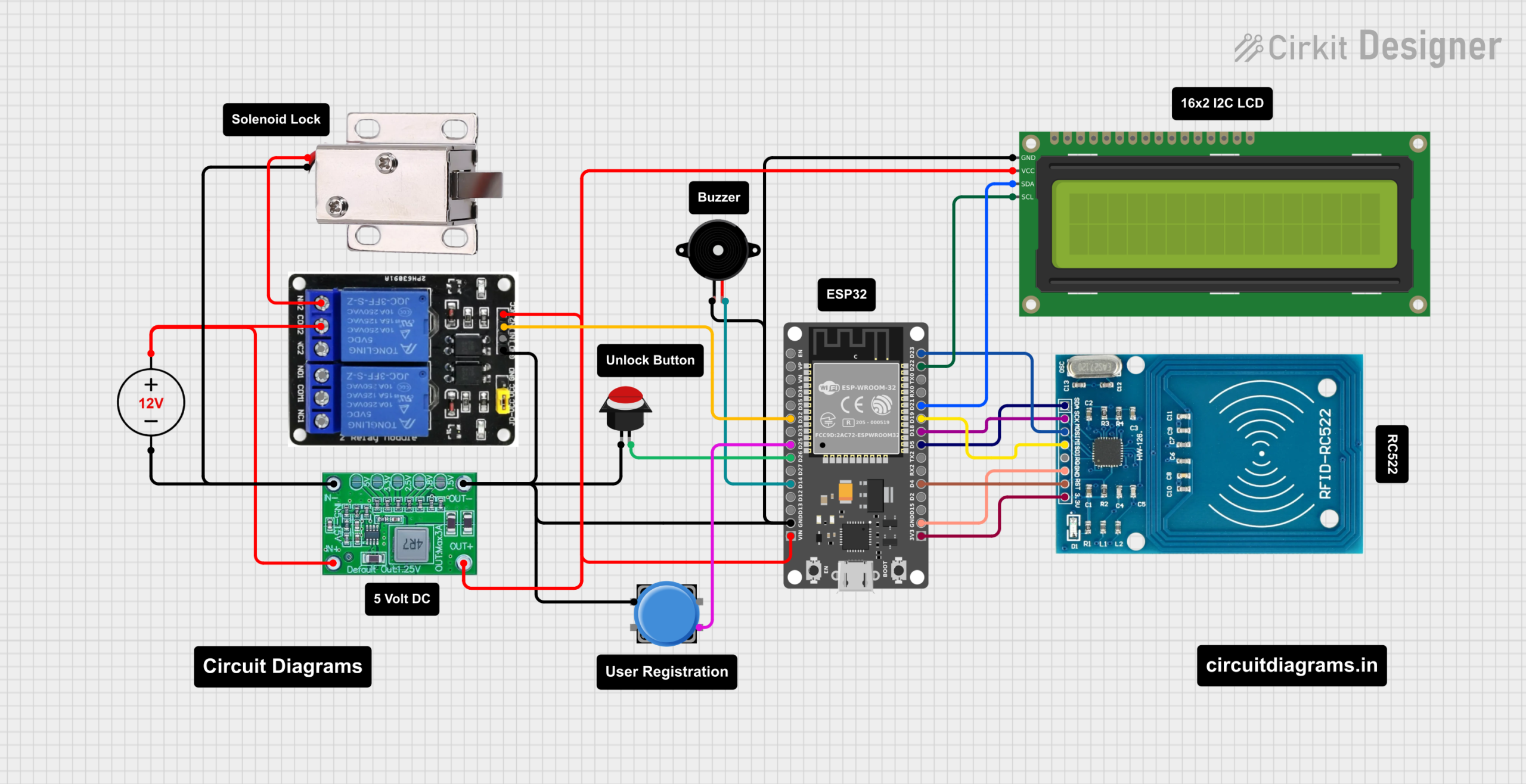
Components Required
Hardware Components
- ESP32 Development Board [https://amzn.to/4caIwv0]
- MFRC522 RFID Module [https://amzn.to/4sPDqeB]
- 16×2 I2C LCD Display [https://amzn.to/4mdreC4]
- 2 Channel Relay Module (Active LOW) [https://amzn.to/4c8ZREz]
- Buzzer [https://amzn.to/41Ow8Ml]
- Power Supply [https://amzn.to/4scyNdt]
PCB Design and Gerber File
After completing the circuit and testing the ESP32 RFID door lock system, I also designed a custom PCB for this project. A PCB makes the project much cleaner, stronger, and more professional compared to a breadboard or jumper-wire setup. Since this project includes multiple parts such as the ESP32, MFRC522 RFID module, relay control section, buzzer, LCD connection, and power input, a proper PCB layout helps keep everything organized in one compact board.
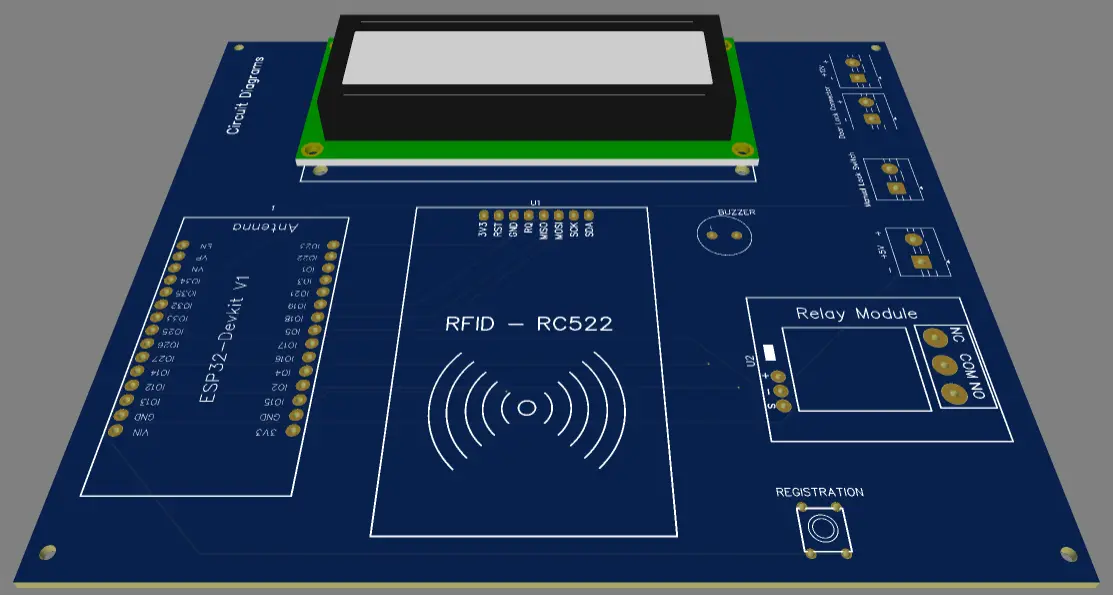
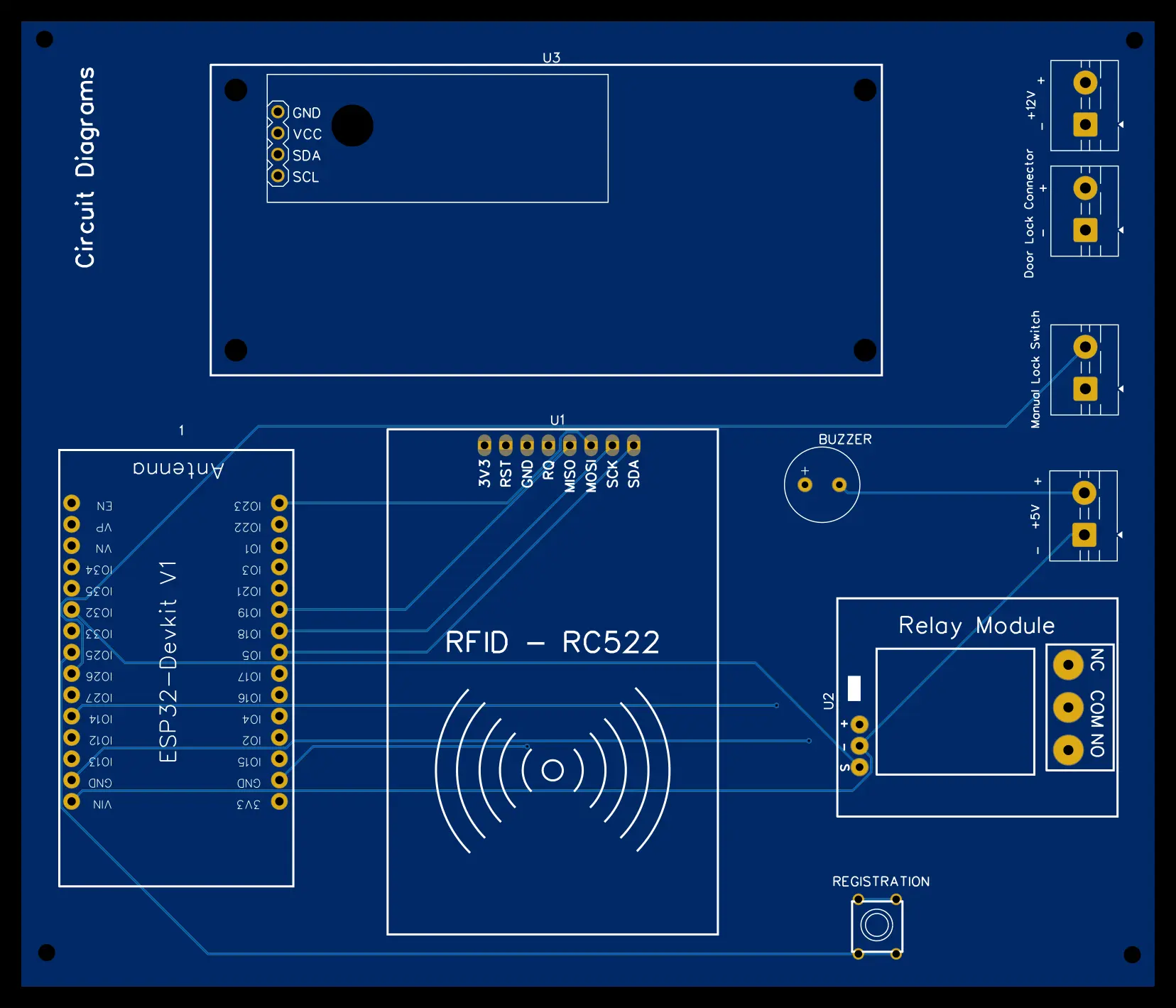
For this project, I created the PCB design and also generated both 2D and 3D views of the board. The 2D view helps to check the component placement, track routing, connector positions, and overall board layout. The 3D view gives a realistic look at how the final assembled PCB will appear after manufacturing. This makes it easier to verify the design before ordering the PCB.
I have also generated the Gerber file for this PCB, which is required for PCB manufacturing. Users can download the Gerber file and directly upload it to the NextPCB website to order the same PCB for this project. You can use their PCB and PCBA services to manufacture the board and even get it assembled professionally.
To order the PCB from NextPCB, follow these simple steps:
- Download the Gerber file provided with this project.
- Go to the NextPCB website.
- Upload the Gerber file in the PCB quote or order section.
- Check the PCB preview to make sure the board layers are detected correctly.
- Select the required PCB quantity, thickness, color, surface finish, and other options.
- For only PCB manufacturing, choose the standard PCB order option.
- For a fully assembled board, choose the PCBA service and upload the required BOM and pick-and-place files if available.
- Review the order details, manufacturing cost, and shipping options.
- Place the order and wait for the manufactured PCB to be delivered.
Using a professionally manufactured PCB improves the overall quality of the ESP32 RFID door lock system. It reduces loose wire problems, makes the project easier to install inside an enclosure, and gives the final build a more polished and reliable look.
Software & Libraries
- Arduino IDE
- MFRC522 Library
- WiFi & WebServer Libraries
- ArduinoJson
- SPIFFS File System
Source Code
#include <WiFi.h>
#include <SPI.h>
#include <MFRC522.h>
#include <Wire.h>
#include <LiquidCrystal_I2C.h>
#include <SPIFFS.h>
#include <WebServer.h>
#include <ArduinoJson.h>
#include <time.h>

/* ---------------- PIN CONFIG ---------------- */
#define SS_PIN         5
#define RST_PIN        4
#define RELAY_PIN      32
#define BUZZER         14
#define BUTTON_PIN     26
#define REG_BUTTON_PIN 25

/* ---------------- RELAY STATES ---------------- */
#define RELAY_LOCKED   LOW
#define RELAY_UNLOCKED HIGH

/* ---------------- OBJECTS ---------------- */
MFRC522 rfid(SS_PIN, RST_PIN);
LiquidCrystal_I2C lcd(0x27, 16, 2);
WebServer server(80);

/* ---------------- WIFI CONFIG ---------------- */
// The AP mode acts as a permanent fallback if home WiFi fails
const char* ap_ssid  = "ESP32_DoorLock";
const char* ap_pass  = "12345678";

// Current STA config (Loaded from SPIFFS)
String current_ssid = "";
String current_pass = "";

/* ---------------- STATE & TIMERS ---------------- */
bool isRegisterMode = false;
unsigned long doorUnlockTimer = 0;
bool doorTimerActive = false;
int lastSecondsRemaining = -1;
unsigned long systemLastUpdate = 0;

/* ---------------- BUZZER ---------------- */
void beep() { tone(BUZZER, 1200, 300); }

/* ---------------- FILE UTILS ---------------- */
String readFile(const char* path) {
  if (!SPIFFS.exists(path)) return "[]";
  File f = SPIFFS.open(path, "r");
  String s = f.readString();
  f.close();
  return s;
}
void writeFile(const char* path, String data) {
  File f = SPIFFS.open(path, "w");
  f.print(data);
  f.close();
}

/* ---------------- DASHBOARD SYNC ---------------- */
void triggerUpdate() { systemLastUpdate = millis(); }
void handleSync() {
  String json = "{\"last_update\":" + String(systemLastUpdate) + "}";
  server.send(200, "application/json", json);
}

/* ---------------- RELAY ---------------- */
void lockDoor() { digitalWrite(RELAY_PIN, RELAY_LOCKED); triggerUpdate(); }
void unlockDoor() { digitalWrite(RELAY_PIN, RELAY_UNLOCKED); triggerUpdate(); }
void triggerDoorUnlock() { unlockDoor(); doorUnlockTimer = millis(); doorTimerActive = true; lastSecondsRemaining = -1; }
bool isDoorLocked() { return digitalRead(RELAY_PIN) == RELAY_LOCKED; }

/* ---------------- TIME ---------------- */
String timeNow() {
  time_t now = time(nullptr);
  struct tm *t = localtime(&now);
  char buf[25];
  sprintf(buf, "%02d-%02d-%04d %02d:%02d:%02d", t->tm_mday, t->tm_mon + 1, t->tm_year + 1900, t->tm_hour, t->tm_min, t->tm_sec);
  return String(buf);
}
long epochNow() { return time(nullptr); }

/* ---------------- FILE SERVE ---------------- */
void serveFile(const char* path, const char* type) {
  if (!SPIFFS.exists(path)) { server.send(404, "text/plain", "File not found"); return; }
  File f = SPIFFS.open(path, "r");
  server.streamFile(f, type);
  f.close();
}

/* ---------------- HTTP ROUTES ---------------- */
void handleRoot()         { serveFile("/index.html", "text/html"); }
void handleUsersPage()    { serveFile("/users.html", "text/html"); }
void handleCSS()          { serveFile("/style.css", "text/css"); }
void handleBootstrapCSS() { serveFile("/bootstrap.css", "text/css"); }
void handleBootstrapJS()  { serveFile("/bootstrap.js", "application/javascript"); }
void handleUsersJSON()    { server.send(200, "application/json", readFile("/users.json")); }
void handleLogsJSON()     { server.send(200, "application/json", readFile("/logs.json")); }

/* -------- WI-FI MANAGEMENT -------- */
void handleGetWiFi() {
  DynamicJsonDocument doc(512);
  deserializeJson(doc, readFile("/wifi.json"));
  doc["pass"] = "********"; // Redact password on frontend
  String out;
  serializeJson(doc, out);
  server.send(200, "application/json", out);
}

void handleSetWiFi() {
  String new_ssid = server.arg("ssid");
  String new_pass = server.arg("pass");
  if (new_ssid == "") { server.send(400, "text/plain", "Missing SSID"); return; }

  DynamicJsonDocument doc(512);
  doc["ssid"] = new_ssid;
  doc["pass"] = new_pass;
  String out;
  serializeJson(doc, out);
  writeFile("/wifi.json", out);

  server.send(200, "text/plain", "restarting");

  lcd.clear();
  lcd.print("WiFi Config Saved");
  lcd.setCursor(0, 1);
  lcd.print("Rebooting...");
  delay(1500);

  ESP.restart(); // Restart ESP32 to apply new settings
}

/* -------- USERS & LOGS -------- */
void handleClearLogs() { writeFile("/logs.json", "[]"); triggerUpdate(); server.send(200, "text/plain", "cleared"); }

void handleAddUser() {
  String uid = server.arg("uid"); String name = server.arg("name");
  if (uid == "" || name == "") { server.send(400, "text/plain", "missing"); return; }
  DynamicJsonDocument doc(4096); deserializeJson(doc, readFile("/users.json")); JsonArray users = doc.as<JsonArray>();
  for (JsonObject u : users) { if (u["uid"] == uid) { server.send(200, "text/plain", "exists"); return; } }
  JsonObject o = users.createNestedObject(); o["uid"] = uid; o["name"] = name;
  String out; serializeJson(users, out); writeFile("/users.json", out);
  if (!isRegisterMode) { lcd.clear(); lcd.print("User Added"); delay(1200); lcd.clear(); lcd.print("Ready for Scan"); }
  triggerUpdate(); server.send(200, "text/plain", "ok");
}

void handleUpdateUser() {
  String uid = server.arg("uid"); String name = server.arg("name");
  if (uid == "" || name == "") { server.send(400, "text/plain", "missing"); return; }
  DynamicJsonDocument doc(4096); deserializeJson(doc, readFile("/users.json")); JsonArray users = doc.as<JsonArray>();
  bool updated = false;
  for (JsonObject u : users) { if (u["uid"] == uid) { u["name"] = name; updated = true; break; } }
  if (updated) { String out; serializeJson(users, out); writeFile("/users.json", out); triggerUpdate(); server.send(200, "text/plain", "updated"); }
  else { server.send(404, "text/plain", "not found"); }
}

void handleDeleteUser() {
  String uid = server.arg("uid");
  DynamicJsonDocument doc(4096); deserializeJson(doc, readFile("/users.json")); JsonArray users = doc.as<JsonArray>();
  for (int i = 0; i < users.size(); i++) { if (users[i]["uid"] == uid) { users.remove(i); break; } }
  String out; serializeJson(users, out); writeFile("/users.json", out); triggerUpdate(); server.send(200, "text/plain", "deleted");
}

/* -------- DOOR CONTROL -------- */
void handleLockDoor()   { lockDoor(); doorTimerActive = false; server.send(200, "text/plain", "locked"); }
void handleUnlockDoor() { triggerDoorUnlock(); server.send(200, "text/plain", "unlocked"); }
void handleDoorStatus() { server.send(200, "application/json", String("{\"locked\":") + (isDoorLocked() ? "true" : "false") + "}"); }

/* ---------------- RFID PROCESS ---------------- */
void processCard(String uid) {
  lcd.clear(); lcd.print("Card Detected"); lcd.setCursor(0, 1); lcd.print(uid); delay(800);
  DynamicJsonDocument udoc(4096); deserializeJson(udoc, readFile("/users.json")); JsonArray users = udoc.as<JsonArray>();
  String name = "";
  for (JsonObject u : users) { if (u["uid"] == uid) { name = u["name"].as<String>(); break; } }

  if (name == "") { lcd.clear(); lcd.print("Access Denied"); beep(); delay(1500); lcd.clear(); lcd.print("Ready for Scan"); return; }

  DynamicJsonDocument ldoc(8192); deserializeJson(ldoc, readFile("/logs.json")); JsonArray logs = ldoc.as<JsonArray>();
  bool userCurrentlyInside = false; int openLogIndex = -1;
  for (int i = logs.size() - 1; i >= 0; i--) {
    if (logs[i]["uid"] == uid && logs[i]["exit"] == "") { userCurrentlyInside = true; openLogIndex = i; break; }
  }

  if (!userCurrentlyInside) {
    JsonObject o = logs.createNestedObject();
    o["uid"] = uid; o["name"] = name; o["entry"] = timeNow(); o["entry_ts"] = epochNow(); o["exit"] = ""; o["exit_ts"] = 0; o["stay_sec"] = 0;
    triggerDoorUnlock();
    lcd.clear(); lcd.print("Welcome"); lcd.setCursor(0, 1); lcd.print(name);
  } else {
    long exitTs = epochNow(); long entryTs = logs[openLogIndex]["entry_ts"];
    logs[openLogIndex]["exit"] = timeNow(); logs[openLogIndex]["exit_ts"] = exitTs; logs[openLogIndex]["stay_sec"] = exitTs - entryTs;
    triggerDoorUnlock();
    lcd.clear(); lcd.print("Goodbye"); lcd.setCursor(0, 1); lcd.print(name);
  }

  String out; serializeJson(logs, out); writeFile("/logs.json", out); triggerUpdate(); delay(1500);
}

/* ---------------- SETUP ---------------- */
void setup() {
  Serial.begin(115200);

  pinMode(RELAY_PIN, OUTPUT);
  pinMode(BUZZER, OUTPUT);
  pinMode(BUTTON_PIN, INPUT_PULLUP);
  pinMode(REG_BUTTON_PIN, INPUT_PULLUP);
  lockDoor();

  Wire.begin(21, 22);
  lcd.init(); lcd.backlight(); lcd.print("Booting System"); delay(1200);

  SPIFFS.begin(true);

  // Create default files if they don't exist
  if (!SPIFFS.exists("/users.json")) writeFile("/users.json", "[]");
  if (!SPIFFS.exists("/logs.json"))  writeFile("/logs.json", "[]");
  if (!SPIFFS.exists("/wifi.json"))  writeFile("/wifi.json", "{\"ssid\":\"\",\"pass\":\"\"}");

  // Load WiFi Config
  DynamicJsonDocument wdoc(512);
  deserializeJson(wdoc, readFile("/wifi.json"));
  current_ssid = wdoc["ssid"].as<String>();
  current_pass = wdoc["pass"].as<String>();

  SPI.begin();
  rfid.PCD_Init();

  WiFi.mode(WIFI_AP_STA);
  WiFi.softAP(ap_ssid, ap_pass);

  // Attempt connection if SSID is configured
  if (current_ssid != "") {
    WiFi.begin(current_ssid.c_str(), current_pass.c_str());
    lcd.clear(); lcd.print("Connecting WiFi:"); lcd.setCursor(0,1); lcd.print(current_ssid);

    int wifi_retries = 0;
    while (WiFi.status() != WL_CONNECTED && wifi_retries < 20) {
      delay(500); wifi_retries++; Serial.print(".");
    }
  }

  lcd.clear();
  if (WiFi.status() == WL_CONNECTED) {
    lcd.print("Home IP:"); lcd.setCursor(0, 1); lcd.print(WiFi.localIP());
    configTime(0, 0, "pool.ntp.org");
  } else {
    lcd.print("Home WiFi Failed"); lcd.setCursor(0, 1); lcd.print("Connect to AP!");
  }
  delay(3000);

  lcd.clear();
  lcd.print("AP: ESP32_Door"); lcd.setCursor(0, 1); lcd.print(WiFi.softAPIP());
  delay(3000);

  server.on("/", handleRoot);
  server.on("/users", handleUsersPage);
  server.on("/style.css", handleCSS);
  server.on("/bootstrap.css", handleBootstrapCSS);
  server.on("/bootstrap.js", handleBootstrapJS);
  server.on("/users.json", handleUsersJSON);
  server.on("/logs.json", handleLogsJSON);

  // Wi-Fi Config Endpoints
  server.on("/getwifi", handleGetWiFi);
  server.on("/setwifi", HTTP_POST, handleSetWiFi);

  server.on("/adduser", handleAddUser);
  server.on("/updateuser", handleUpdateUser);
  server.on("/deleteuser", handleDeleteUser);
  server.on("/lock", handleLockDoor);
  server.on("/unlock", handleUnlockDoor);
  server.on("/door", handleDoorStatus);
  server.on("/clearlogs", handleClearLogs);
  server.on("/sync", handleSync);

  server.begin();
  triggerUpdate();
  lcd.clear(); lcd.print("Ready for Scan");
}

/* ---------------- LOOP ---------------- */
void loop() {
  server.handleClient();

  // --- 20 SEC AUTO LOCK TIMER & LCD COUNTDOWN ---
  if (doorTimerActive) {
    unsigned long elapsed = millis() - doorUnlockTimer;
    int secondsRemaining = 20 - (elapsed / 1000);
    if (secondsRemaining <= 0) {
      lockDoor(); doorTimerActive = false; lastSecondsRemaining = -1;
      if (!isRegisterMode) { lcd.clear(); lcd.print("Ready for Scan"); }
    } else {
      if (secondsRemaining != lastSecondsRemaining && !isRegisterMode) {
        lcd.clear(); lcd.print("Door Unlocked"); lcd.setCursor(0, 1); lcd.print(String(secondsRemaining) + " sec left..");
        lastSecondsRemaining = secondsRemaining;
      }
    }
  }

  // --- REGISTRATION BUTTON LOGIC ---
  if (digitalRead(REG_BUTTON_PIN) == LOW) {
    delay(50);
    if (digitalRead(REG_BUTTON_PIN) == LOW) {
      isRegisterMode = true; lcd.clear(); lcd.print("Place the card"); beep();
      while (digitalRead(REG_BUTTON_PIN) == LOW) delay(10);
    }
  }

  // --- MANUAL EXIT BUTTON LOGIC ---
  if (digitalRead(BUTTON_PIN) == LOW) {
    delay(50);
    if (digitalRead(BUTTON_PIN) == LOW) {
      triggerDoorUnlock();
      lcd.clear(); lcd.print("Door Unlocked"); lcd.setCursor(0, 1); lcd.print("Please Exit"); beep();
      while (digitalRead(BUTTON_PIN) == LOW) delay(10);
      delay(1500);
    }
  }

  // --- RFID LOGIC ---
  if (!rfid.PICC_IsNewCardPresent()) return;
  if (!rfid.PICC_ReadCardSerial()) return;

  String uid = "";
  for (byte i = 0; i < rfid.uid.size; i++) {
    if (rfid.uid.uidByte[i] < 0x10) uid += "0";
    uid += String(rfid.uid.uidByte[i], HEX);
  }
  uid.toUpperCase();

  if (isRegisterMode) {
    lcd.clear(); lcd.print("UID:"); lcd.setCursor(0, 1); lcd.print(uid); beep(); delay(1000);
    DynamicJsonDocument udoc(4096); deserializeJson(udoc, readFile("/users.json")); JsonArray users = udoc.as<JsonArray>();
    bool exists = false;
    for (JsonObject u : users) { if (u["uid"] == uid) { exists = true; break; } }

    if (!exists) {
      JsonObject o = users.createNestedObject(); o["uid"] = uid; o["name"] = "New User " + uid.substring(0, 4);
      String out; serializeJson(users, out); writeFile("/users.json", out); triggerUpdate();
      lcd.clear(); lcd.print("Saved to Web!");
    } else {
      lcd.clear(); lcd.print("Card Exists!");
    }
    delay(2000);
    if (!doorTimerActive) { lcd.clear(); lcd.print("Ready for Scan"); }
    isRegisterMode = false;
  } else {
    processCard(uid);
  }

  rfid.PICC_HaltA();
  rfid.PCD_StopCrypto1();
  delay(700);
}Video Tutorial
How the RFID Door Lock System Works?
The ESP32 RFID door lock system works by combining RFID card reading, user verification, relay control, activity logging, and web-based communication. When a user scans an RFID card, the ESP32 reads the card UID, checks whether it belongs to an authorized person, and then decides whether to unlock or keep the door locked. At the same time, the system updates logs, shows messages on the LCD, and keeps data available through the web dashboard.
RFID Card Detection Process

- The system continuously waits for a new RFID card near the MFRC522 RFID reader.
- In the main loop, the ESP32 checks whether a new card is present and whether its serial data can be read successfully.

- Once detected, the card UID is converted into a readable uppercase string format.
- This UID becomes the main identity value used by the system for access control.
- After processing the card, the RFID communication is stopped properly to prepare for the next scan.
User Authentication System

- After reading the RFID card UID, the ESP32 loads the saved user list from users.json stored in SPIFFS.
- It compares the scanned UID with the UIDs of all registered users.

- If a matching UID is found, the associated user name is retrieved and access is allowed.
- If no match is found, the system treats the card as unauthorized and denies access.
- In case of unauthorized access, the LCD displays Access Denied and the buzzer gives an alert sound.
Entry and Exit Logging Mechanism

- The project keeps a record of user activity in logs.json.
- When an authorized user enters, the system creates a new log entry containing UID, name, entry time, entry timestamp, and empty exit details.
- When the same user exits, the system updates the latest open record by writing the exit time and exit timestamp.
- It also calculates the total time spent inside by subtracting the entry timestamp from the exit timestamp.
- This makes the system useful not only for door security but also for attendance and visit tracking.
Relay-Based Door Control Logic

- The door lock is controlled using a relay connected to the ESP32.
- In this project, the relay is defined as an active LOW relay, so the lock and unlock actions depend on specific output states.
- When an authorized user enters, the ESP32 triggers the relay to unlock the door.
- When the exit process is completed, the relay is switched back to lock the door.
- This relay-based mechanism allows the ESP32 to control an electric door lock automatically without manual intervention.
Web Server Communication
- The ESP32 connects to Wi-Fi and starts a built-in web server.
- This server provides routes for the main dashboard, users page, CSS file, user data, log data, and door control actions.
- The HTML and CSS files are served from SPIFFS, allowing the device to display a browser-based interface.
- JSON endpoints such as /users.json and /logs.json make it possible to view stored information in real time.
- Additional routes like /adduser, /deleteuser, /lock, /unlock, and /door allow browser-based management of users and door status.
ESP32 Web Dashboard Overview
The ESP32 web dashboard is one of the most useful parts of this RFID door lock system. Instead of controlling everything only from hardware, the user can open the ESP32 IP address in a browser and manage the system through simple web pages. In your uploaded project, the ESP32 serves HTML and CSS files from SPIFFS and provides different routes for users, logs, and door control. This makes the project more practical, user-friendly, and closer to a real smart access control system.
User Management Interface
- The ESP32 hosts a dedicated user management page through the web server.
- This page helps the admin view and manage RFID users more easily from a browser.
- The dashboard structure separates the main page and the users page, making the system more organized.
- User information is stored in users.json, which the dashboard can access directly.
- This interface removes the need to hardcode every user manually inside the sketch.
Add and Delete RFID Users
- The dashboard allows new RFID users to be added through the /adduser route.
- For each new user, the system stores the RFID UID and the user name in the JSON database.
- Before adding a user, the ESP32 checks whether the UID already exists to avoid duplicate entries.
- The dashboard also supports deleting users through the /deleteuser route.
- Once deleted, that RFID card will no longer be recognized as an authorized access card.
- This makes the ESP32 door lock system flexible and easy to update whenever users change.
Door Lock/Unlock Controls
- The web dashboard provides direct control over the door lock mechanism.
- Using browser-based commands, the admin can manually lock or unlock the door.
- In the code, these actions are handled through the /lock and /unlock routes.
- The current lock state can also be checked using the /door status route.
- This feature is very useful for testing, emergency access, or remote control within the same Wi-Fi network.
Real-Time Logs Monitoring
- The ESP32 dashboard can provide access to real-time logs through the /logs.json route.
- Each log entry stores important details such as UID, user name, entry time, exit time, and stay duration.
- This makes it easy to monitor who entered, when they entered, and when they left.
- Because logs are stored in SPIFFS, the records remain available even after restarting the ESP32.
- This logging system adds an extra layer of monitoring and makes the project suitable for access tracking as well as door security.
File System (SPIFFS) Usage in This Project
The SPIFFS file system plays a very important role in this ESP32 RFID door lock project. Instead of storing everything only in temporary memory, the system uses SPIFFS to save important files directly inside the ESP32 flash memory. This allows user records, access logs, and web dashboard files to remain available even after restart or power loss. In your uploaded code, SPIFFS is used for data storage as well as for serving the dashboard files to the browser.
Storing User Data (users.json)
- The system stores all authorized RFID user information inside a file named users.json.
- Each user record contains important details such as the RFID card UID and the user name.
- When a new user is added from the dashboard, the ESP32 updates this JSON file instead of hardcoding data inside the main sketch.
- During card scanning, the ESP32 reads users.json and checks whether the scanned UID matches any registered user.
- This approach makes user management easier, more flexible, and more practical for real-world access control systems.
Logging Access History (logs.json)
- The project stores door access activity in another file named logs.json.
- Every time an authorized user enters, a new log record is created with details like UID, name, entry time, and entry timestamp.
- When the same user exits, the ESP32 updates that log with exit time, exit timestamp, and total stay duration.
- This creates a complete history of user movement through the door lock system.
- Because the logs are stored in SPIFFS, the information remains saved even if the ESP32 restarts.
Serving HTML, CSS Files
- SPIFFS is also used to store the web dashboard files such as index.html, users.html, and style.css.
- When the browser accesses the ESP32 IP address, the web server loads these files directly from SPIFFS and displays the dashboard pages.
- This allows the ESP32 to act like a small web host for the RFID door lock interface.
- Keeping HTML and CSS files in SPIFFS makes it much easier to design and update the dashboard without putting all webpage code inside the main Arduino sketch.
- This method keeps the project more organized and helps create a cleaner smart IoT access control system.
Step-by-Step Code Explanation
The code of this ESP32 RFID door lock system is divided into several important sections, and each section has a specific job. Together, these parts make the project work as a smart access control system with RFID authentication, web dashboard support, relay-based door control, and log storage. Below is a simple explanation of the main code blocks used in your uploaded project.
WiFi Configuration Setup
- The project starts by defining the Wi-Fi name and password using
const char* ssidandconst char* password. - Inside the
setup()function, the ESP32 usesWiFi.begin(ssid, password)to connect to the selected Wi-Fi network. - While connecting, the LCD displays a Connecting WiFi message to show system status.
- Once the connection is successful, the ESP32 displays its local IP address on the LCD.
- This IP address is important because it is used to open the web dashboard in a browser on the same network.
RFID Initialization
- The RFID module used in this project is the MFRC522.
- At the beginning of the code, the RFID object is created using the configured SS pin and RST pin.
- In the
setup()function,SPI.begin()starts SPI communication, andrfid.PCD_Init()initializes the RFID reader. - In the
loop()function, the ESP32 continuously checks whether a new RFID card is present. - If a card is found, the system reads its UID, converts it into uppercase format, and sends it for processing.
Web Server Routes Handling
- The project uses an ESP32 WebServer object to create a browser-based dashboard.
- Different web routes are defined inside the
setup()function usingserver.on(). - For example,
/opens the main page,/usersopens the users page, and/style.cssloads the dashboard CSS file. - Other routes such as
/adduser,/deleteuser,/lock,/unlock, and/doorhandle user management and door control actions. - The function
server.handleClient()inside theloop()keeps listening for browser requests and serves the required pages or actions.
JSON Data Handling
- The project stores user records and access logs in JSON files using SPIFFS.
- The file users.json is used to save RFID user details such as UID and name.
- The file logs.json is used to save entry and exit activity with time information.
- Functions like
readFile()andwriteFile()are used to read and update these JSON files. - The code uses ArduinoJson with
DynamicJsonDocument,JsonArray, andJsonObjectto parse, modify, and save JSON data properly.
Door Control Functions
- The project controls the door lock using a relay connected to the ESP32.
- Two separate functions,
lockDoor()andunlockDoor(), are used to change the relay state. - Since the relay is defined as active LOW, the code uses custom constants to set locked and unlocked conditions correctly.
- The function
isDoorLocked()checks the current door state by reading the relay pin. - These door control functions are used both during RFID access processing and through web dashboard commands like manual lock or unlock.
Security Features of the System
The ESP32 RFID door lock system includes several useful security features that help make access control safer, smarter, and more reliable. Instead of only opening or closing a lock, the system also verifies RFID card identity, detects unauthorized access attempts, stores activity records with time details, and controls the relay-based locking process in a managed way. These features work together to improve both security and monitoring in the project.
Unauthorized Access Detection
- The system checks every scanned RFID card before allowing entry.
- If the scanned UID is not found in the saved user database, the card is treated as unauthorized.
- In that case, the LCD displays an Access Denied message.
- The buzzer also gives an alert sound to indicate that access has been rejected.
- This helps prevent unknown or unregistered cards from unlocking the door.
Data Logging with Timestamps
- The project stores access activity inside logs.json for future tracking.
- Each authorized entry is saved with details such as UID, user name, entry time, and entry timestamp.
- When the user exits, the system updates the same log with exit time, exit timestamp, and total stay duration.
- This timestamp-based logging makes the system useful for monitoring, attendance, and security record keeping.
- Since the logs are stored in SPIFFS, they remain available even after restarting the ESP32.
Controlled Relay Switching
- The door lock is managed through a relay controlled by the ESP32.
- The code defines clear relay states for locked and unlocked conditions.
- The relay only changes state after proper card processing, which helps avoid random or unsafe switching.
- When an authorized user is verified, the relay unlocks the door.
- When the exit process is completed, the relay switches back to the locked state.
UID-Based Authentication
- Every RFID card has its own unique UID, which works as the main identity for the system.
- The ESP32 reads this UID and compares it against the list of registered users stored in users.json.
- Only matching UIDs are accepted for entry.
- This means access is based on card identity, not just physical possession of any RFID card.
- UID-based authentication makes the system simple, fast, and effective for smart door security projects.
Advantages of Using ESP32 for Door Lock System
The ESP32 is one of the best microcontrollers for building a smart RFID door lock system because it combines wireless connectivity, processing power, and flexibility in a single board. In this project, the ESP32 handles RFID scanning, relay control, LCD updates, file storage, and web dashboard communication at the same time. That is why it is a strong choice for modern DIY access control projects.
Built-in WiFi Capability
- The ESP32 comes with built-in Wi-Fi, so no extra Wi-Fi module is needed.
- This allows the door lock system to connect directly to a local network.
- In your project, Wi-Fi is used to host the web dashboard and access control pages.
- The IP address shown on the LCD makes it easy to open the dashboard from a browser.
- This built-in wireless feature makes the project more advanced than a basic standalone RFID lock.
Real-Time Monitoring
- ESP32 makes real-time monitoring possible through its web server capability.
- User activity, door status, and access logs can be checked through the dashboard.
- This gives the system both control and monitoring in one device.
- Real-time updates improve usability and help the admin manage the door more efficiently.
- It also makes the project suitable for smart home and office security applications.
Cost-Effective Solution
- The ESP32 is a low-cost but powerful development board.
- It provides Wi-Fi, multiple GPIO pins, and good processing performance at an affordable price.
- Because of this, you can build a complete smart door lock system without using many extra modules.
- This makes the project budget-friendly for students, DIY makers, and small businesses.
- It delivers smart IoT functionality at a much lower cost compared to commercial access control systems.
Scalable for IoT Applications
- ESP32 is highly suitable for future expansion.
- Once the basic RFID door lock works, more features can be added easily.
- Examples include cloud connection, mobile app control, remote notifications, or multiple door support.
- In your current project, the web server and SPIFFS already create a strong base for future upgrades.
- This makes ESP32 a scalable platform for more advanced IoT security systems.
Common Problems and Troubleshooting
Like any electronics project, an ESP32 RFID door lock system can sometimes face practical issues during setup or testing. Most of these problems are related to wiring, power supply, Wi-Fi settings, or file handling. Below are some common issues and simple troubleshooting points for this project.
RFID Not Detecting Cards
- Check whether the MFRC522 module wiring is correct.
- Make sure the SS pin and RST pin match the values defined in the code.
- Verify that SPI communication is properly started using
SPI.begin(). - Confirm that the RFID card is compatible with the MFRC522 reader.
- Also make sure the reader is getting stable power and proper ground connection.
WiFi Not Connecting
- Confirm that the Wi-Fi name and password written in the code are correct.
- Make sure the router is working and the ESP32 is within signal range.
- Check the LCD screen to see whether the connection process is stuck.
- If needed, restart the ESP32 and router and test again.
- Wrong credentials are one of the most common causes of this problem.
Relay Not Switching Properly
- Verify that the relay module is connected to the correct GPIO pin.
- This project uses an active LOW relay, so the lock logic depends on LOW and HIGH states correctly.
- If the relay behaves in reverse, recheck the relay type and code logic.
- Make sure the relay module has enough power and common ground with the ESP32.
- Faulty wiring or wrong relay type can stop the door lock from working properly.
LCD Display Not Working
- Check the I2C wiring of the 16×2 LCD, especially SDA and SCL pins.
- Confirm that the LCD address, such as
0x27, matches your hardware. - Make sure
lcd.init()andlcd.backlight()are running correctly in the code. - If nothing appears on the screen, test the LCD separately first.
- Poor wiring or wrong I2C address is often the reason behind LCD problems.
Web Dashboard Not Loading
- Make sure the ESP32 is connected to Wi-Fi and shows a valid IP address on the LCD.
- Confirm that the HTML and CSS files are uploaded correctly to SPIFFS.
- If SPIFFS files are missing, the browser may show File not found errors.
- Ensure the browser is opened using the correct local IP address of the ESP32.
- Also verify that the server routes such as
/,/users, and/style.cssare correctly defined.
Future Improvements and Enhancements
This ESP32 RFID door lock project already offers smart access control, but it can be improved even further with more advanced IoT features. Because the ESP32 is flexible and powerful, many new functions can be added later to make the system even smarter and more secure.
Mobile App Integration
- A mobile app can be added for easier control and monitoring.
- This would allow users to check door status from a smartphone.
- Admins could also manage access records or receive alerts through the app.
- App integration would make the project more user-friendly and modern.
- It would also improve convenience for daily use.
Fingerprint + RFID Hybrid System
- Security can be increased by combining fingerprint authentication with RFID cards.
- In that case, access would only be allowed if both identity checks are valid.
- This creates a stronger multi-layer security system.
- It is especially useful for offices, labs, and restricted zones.
- A hybrid system reduces the risk of unauthorized card-based access.
Cloud Storage for Logs
- Instead of storing logs only in SPIFFS, they can also be uploaded to the cloud.
- This would make records safer and more accessible from anywhere.
- Cloud logging can help in long-term storage and advanced analytics.
- It also protects records even if the device is damaged or reset.
- This feature would make the system more suitable for professional use.
Remote Access via Internet
- At present, the dashboard works mainly inside the same Wi-Fi network.
- Future upgrades could allow secure remote internet access.
- This would let users monitor and control the door system from anywhere.
- Features like notifications and remote unlock requests could also be added.
- This would turn the system into a full IoT smart security platform.
Face Recognition Integration
- Another advanced upgrade is adding face recognition for extra identity verification.
- This can make the door lock system smarter and more secure.
- Face recognition would be useful in modern office or high-security environments.
- It can also be combined with RFID for dual authentication.
- This type of improvement would give the project a more premium and futuristic feel.
Applications of RFID Smart Door Lock System
An ESP32 RFID smart door lock system can be used in many practical areas where access control is important. Because it supports authentication, logging, and web-based management, it is useful in both personal and professional environments.
Home Automation
- The system can be used as a smart door lock for homes.
- Family members can use RFID cards instead of physical keys.
- This improves convenience and gives a modern touch to home security.
- It can also be expanded with mobile or internet-based control in the future.
- This makes it ideal for DIY home automation projects.
Office Access Control
- Offices can use the system to manage authorized employee access.
- Entry and exit logs can help in attendance and security tracking.
- Admins can add or remove users easily from the dashboard.
- It provides a low-cost access control option for small businesses.
- This makes it practical for office security solutions.
Labs and Secure Areas
- The system is very useful for restricted rooms, labs, and secure zones.
- Only registered RFID users can enter these protected areas.
- The log history helps in monitoring movement and access activity.
- Buzzer alerts and authentication checks improve safety.
- This makes the project suitable for controlled environments.
Hostel or PG Entry System
- Hostels and PG accommodations can use this system for room or gate access.
- Each resident can be assigned an RFID card for secure entry.
- The logging feature can help maintain entry-exit records.
- This can improve both convenience and management efficiency.
- It is a smart and affordable solution for shared living spaces.
Conclusion
The ESP32 RFID door lock system with web dashboard is a smart and practical IoT security project that combines RFID authentication, relay-based locking, LCD monitoring, web-based management, and log storage in one complete setup. It is much more than a simple electronic lock because it also provides access control, activity tracking, and user management features. Special thanks to NextPCB for sponsoring this project and supporting makers, students, and electronics developers with their PCB and PCBA manufacturing services.
Summary of the System
- The project uses an MFRC522 RFID reader to detect RFID cards.
- The ESP32 checks each card UID against saved users in users.json.
- Authorized users can unlock the door, while unauthorized users are denied access.
- The system records entry and exit history in logs.json.
- A relay controls the door lock, while the LCD and web dashboard provide monitoring and management.
Why This Is a Powerful DIY IoT Project?
- It combines hardware and software in a very practical way.
- It uses the Wi-Fi capability of ESP32 to create a browser-based dashboard.
- It stores user and log data using SPIFFS, making the system more advanced than a normal RFID lock.
- It is affordable, expandable, and suitable for many real-world applications.
- For students, makers, and electronics enthusiasts, it is an excellent project to learn IoT access control.
Final Thoughts
- This project is a strong example of how IoT can improve traditional door security.
- It offers a good balance of security, automation, and convenience.
- With future upgrades like mobile apps, cloud logging, or biometric authentication, it can become even more powerful.
- For anyone interested in building a smart door lock using ESP32, this is a highly useful and impressive DIY project.
- It is both a learning project and a practical real-world solution.
FAQs
How Secure Is an RFID Door Lock System?
Unknown cards are rejected, and the buzzer alert plus LCD message help indicate unauthorized access attempts. However, the overall security also depends on card type, system design, and whether extra layers like fingerprint or cloud alerts are added later.
Can I Access the System Remotely?
What Happens If WiFi Is Disconnected?
Can Multiple Users Be Added?
Is ESP32 Better Than Arduino for This Project?
The main reason is that ESP32 has built-in Wi-Fi, which is essential for the web dashboard and IoT-based control features.
It also has better processing capability and more flexibility for handling RFID, JSON data, SPIFFS, and web server functions together.
A regular Arduino can still build a simple RFID door lock, but it would need extra modules for Wi-Fi and advanced dashboard features.
That is why ESP32 is more suitable for a smart RFID door lock system with web-based access management.