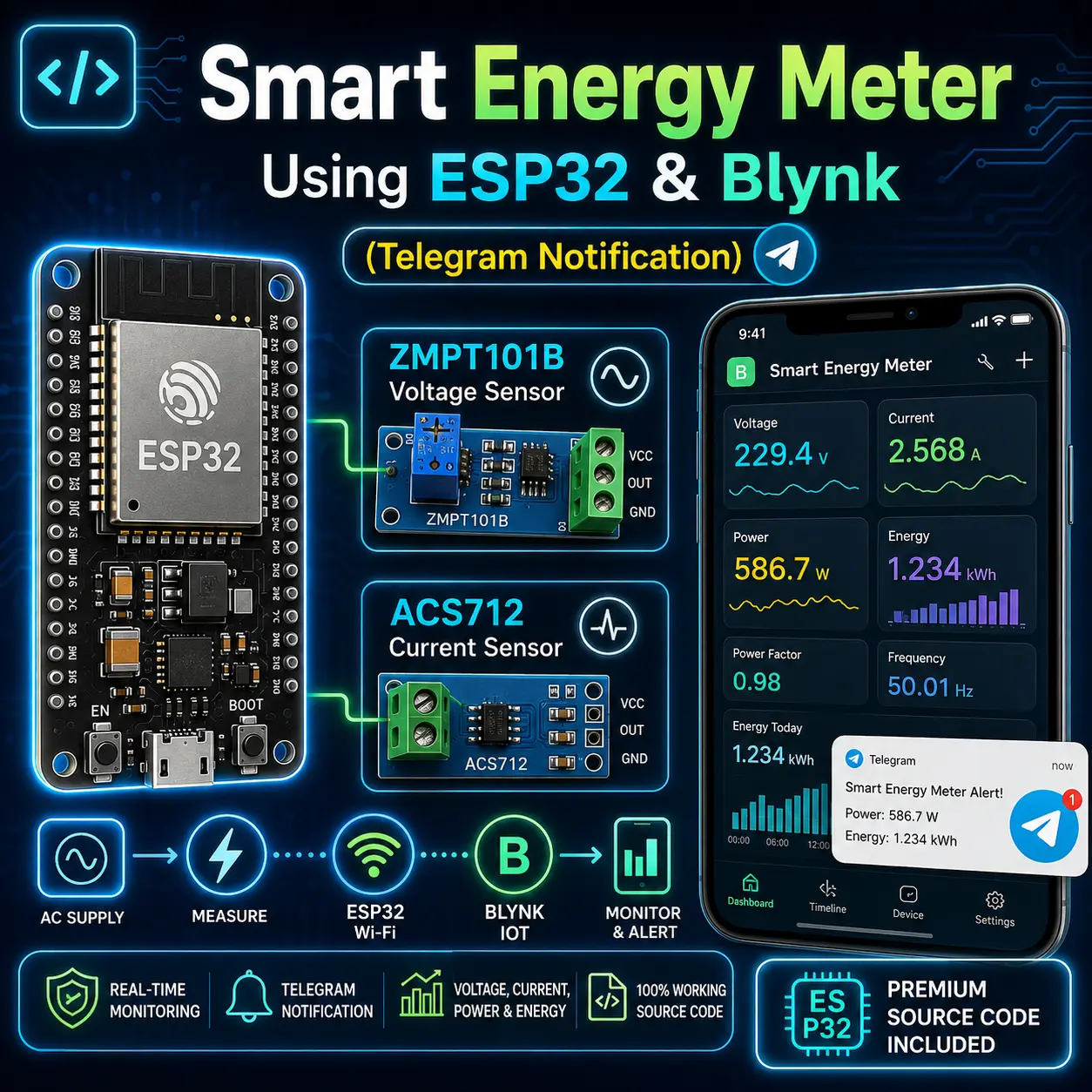
Smart Energy Meter (Telegram Notification) Complete Project Bundle
$3.29
Description
The IoT Smart Energy Meter using ESP32 is an advanced DIY energy monitoring solution designed for accurate measurement of real electrical parameters. It uses EmonLib to calculate true RMS voltage, real current, real power, and kWh energy, ensuring precise readings suitable for home and industrial applications.
This project features a 16×2 I2C LCD for real-time local monitoring with a button to switch display pages and long-press energy reset. Energy data is stored safely in EEPROM, so values are retained even after power failure.
The system integrates seamlessly with Blynk IoT, allowing users to monitor voltage, current, power, energy, and electricity cost remotely on a smartphone. Additionally, Telegram bot integration sends automatic energy and billing notifications.
Ideal for smart home energy monitoring, prepaid meters, load analysis, and educational projects, this ESP32 energy meter offers professional-level features in a compact, low-cost design.
Components Required
- ESP32 Development Board
- ZMPT101B Voltage Sensor
- ACS712 Current Sensor (30 Amp)
- 16×2 I2C LCD Display (SDA, SCL Enabled)
- 5V DC Adapter or USB supply
- Push Button
- Output AC Socket
- AC wires
*Important Instructions
- Make sure to setup Blynk IoT dashboard properly and extract Blynk Template Name, Template ID, and Blynk Authentication Token from there. If you will not provide all three credentials to the code, Blynk will not connect to the ESP32 and also LCD will not show anything.
- Also make sure to provide correct WiFi Name And Password to the code. If you will not provide the credentials to the code, The system cannot connect with WiFi netowrk and also LCD will not show anything. So the system will be offline.
- Make sure you need to provide your 2.4GHz WiFi network name only. ESP32 cannot work with 5GHz network.
- There is an another version of source code available to download where you can run the system without the credentials. LCD will properly without internet connection. But if you need to go online then provide WiFi and Blynk credentials and upload again. Both method works.
🔹 Specifications
- Real RMS Voltage Measurement
- Real Current Calculation
- True Active Power (Watts)
- Energy Measurement in kWh
- Electricity Cost Calculation
- EEPROM Data Backup
- LCD Page Switching Button
- Long-Press Energy Reset
- Blynk IoT App Dashboard
- Telegram Energy & Bill Alerts
dora minas –
I would like to sincerely thank tanmuy kundu for his invaluable guidance on my project. He was always approachable, patient, and provided clear, practical advice whenever I faced challenges. His expertise helped me stay on track and complete the project successfully. I truly appreciate his dedication and encouragement throughout the process