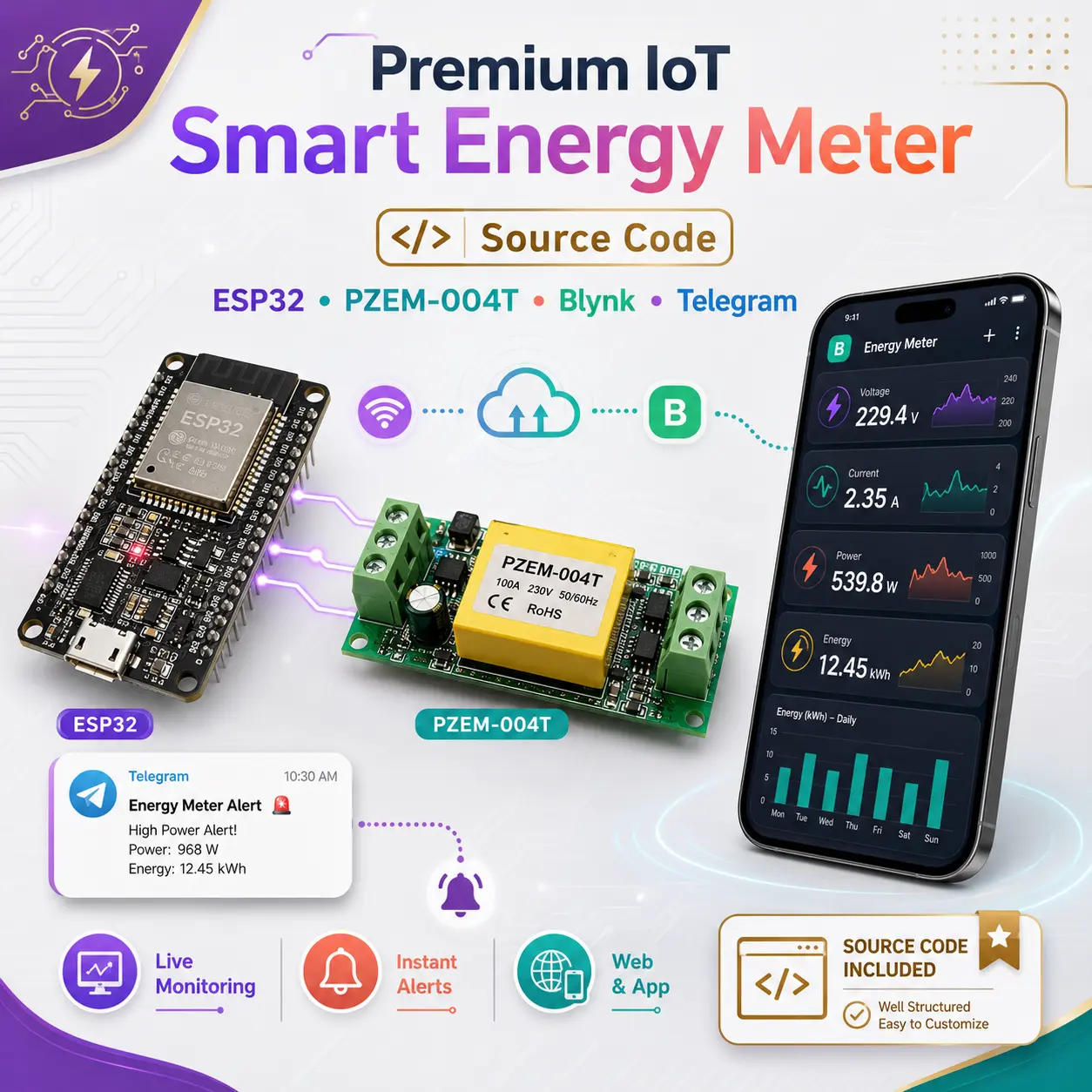
Premium Smart Energy Meter (Telegram Notification)
₹299.00
Description
Take your electronics prototyping to the next level with this robust, commercial-ready source code. Whether you are building a smart home solution or a custom power monitoring product, this code provides a highly reliable foundation using the ESP32 and the highly accurate PZEM-004T module.
🌟 Key Features Included in the Code:
- Precision Measurement: Direct integration with the PZEM-004T (v3.0) for accurate Voltage, Current, Power, Energy (kWh), Frequency, and Power Factor readings.
- Blynk IoT Integration: Fully configured virtual pins (V0-V6) to push real-time data to your custom Blynk mobile or web dashboard.
- Secure Telegram Alerts: Built-in HTTPS/SSL support to automatically send daily energy usage and cost reports directly to your Telegram app.
- Smart EEPROM Wear Protection: Unlike basic codes that burn out the ESP32’s flash memory, this code includes a tracking threshold (saves only every 0.05 kWh) to guarantee hardware longevity.
- Interactive 4-Page LCD UI: Non-blocking display logic to cycle through critical data right on the physical device.
- Hardware Reset Button: Integrated multi-second hold logic to safely wipe energy data and reset the system.
🛠️ Hardware Requirements
To use this code, you will need the following components:
- ESP32 Development Board
- PZEM-004T (v3.0) UART Communication Module
- 16×2 I2C Liquid Crystal Display (LCD)
- 1kΩ Resistor (Crucial for logic level shifting between PZEM and ESP32)
- Standard Push Button
- Veroboard or Breadboard
- Male to Male and Male to Female Jumper Wires
- 5V Power Supply
- AC 1.0 sqmm Wire
- AC Socket for Output Load
📦 What You Get with Your Purchase?
- Instant digital download of the
.inoArduino source code file. - Clean, heavily commented code that is easy to customize.
- A list of all required libraries (PZEM004Tv30, ArduinoJson v7, BlynkSimpleEsp32, etc.) for a frictionless compilation.
📖 Setup & Installation Guide
Welcome! This guide will walk you through configuring the source code and uploading it to your ESP32 board.
Prerequisites
- Download and install the latest Arduino IDE.
- Ensure you have a high-quality micro-USB or USB-C cable (must support data transfer, not just charging).
Step 1: Add ESP32 Support to Arduino IDE
By default, the Arduino IDE doesn’t know how to talk to an ESP32. Let’s add it.
- Open the Arduino IDE. Go to File > Preferences.
- In the Additional Boards Manager URLs field, paste this exact link:
[https://raw.githubusercontent.com/espressif/arduino-esp32/gh-pages/package_esp32_index.json] - Click OK.
- Go to Tools > Board > Boards Manager.
- Search for “esp32” and click Install on the package by Espressif Systems.
Step 2: Install Required Libraries
Your code relies on specific libraries to function. Go to Sketch > Include Library > Manage Libraries and search for/install the following:
- Blynk by Volodymyr Shymanskyy
- LiquidCrystal I2C by Frank de Brabander
- PZEM004Tv30 by Jakub Mandula
- ArduinoJson by Benoit Blanchon (Important: Make sure it installs Version 7.x)
Step 3: Configure Your Code (User Settings)
Open the .ino file in the Arduino IDE. Scroll down to the // ======================= USER CONFIGURATION ======================= section. You need to update these details:
1. Blynk Credentials
- Log into Blynk Console and create a new Template.
- Copy the Template ID, Template Name, and Auth Token provided by Blynk.
- Paste them into the code inside the quotation marks:
// 1. Blynk IoT Credentials
#define BLYNK_TEMPLATE_ID "PASTE_BLYNK_TEMPLATE_ID"
#define BLYNK_TEMPLATE_NAME "PASTE_BLYNK_TEMPLATE_NAME"
#define BLYNK_AUTH_TOKEN "PASTE_BLYNK_AUTH_TOKEN"
2. WiFi Settings
- Enter your local 2.4GHz WiFi network name and password:
// 2. WiFi Credentials
char ssid[] = "PASTE_WIFI_SSID_NAME";
char pass[] = "PASTE_WIFI_PASSWORD";3. Telegram Bot Setup
- Open Telegram, search for @BotFather, and send
/newbotto create a bot. BotFather will give you an API Token. - Search for @userinfobot (or similar) in Telegram to find your personal Chat ID (a string of numbers).
- Paste both into the code:
// 3. Telegram Bot Credentials
const String telegramBotToken = "YOUR_BOT_TOKEN_HERE";
const String telegramChatID = "YOUR_CHAT_ID_HERE"; 4. Electricity Pricing
- Update the
COST_PER_KWHto match your local electricity tariff (e.g., in Rupees):
#define COST_PER_KWH 8.0 Step 4: Upload the Code to Your ESP32
- Plug your ESP32 into your computer.
- Go to Tools > Board > esp32 and select your specific board (usually DOIT ESP32 DEVKIT V1 or ESP32 Dev Module).
- Go to Tools > Port and select the COM port your ESP32 is connected to (e.g., COM3 on Windows, or
/dev/cu.usbserialon Mac). - Click the Upload button (the right-pointing arrow at the top left of the IDE).
⚠️ Troubleshooting the Upload
If the console at the bottom says Connecting... and then times out with a Fatal Error, do this:
- Click Upload again.
- When you see
Connecting...appear at the bottom, press and hold the “BOOT” button physically located on the ESP32 board. - Once you see writing percentages (e.g.,
Writing at 0x00010000... (10 %)), release the BOOT button.
Step 5: Final Check
Once the upload says “Done Uploading”, open the Serial Monitor (magnifying glass icon in the top right). Set the baud rate to 115200.
You should see the ESP32 connect to WiFi, connect to Blynk, and begin displaying live voltage and current readings from your PZEM-004T!
Note: This is a digital product containing software source code only. No physical hardware is included.
Reviews
There are no reviews yet.